class: title-slide, middle ## .font200[<svg viewBox="0 0 581 512" style="height:1em;fill:currentColor;position:relative;display:inline-block;top:.1em;" xmlns="http://www.w3.org/2000/svg"> <path d="M581 226.6C581 119.1 450.9 32 290.5 32S0 119.1 0 226.6C0 322.4 103.3 402 239.4 418.1V480h99.1v-61.5c24.3-2.7 47.6-7.4 69.4-13.9L448 480h112l-67.4-113.7c54.5-35.4 88.4-84.9 88.4-139.7zm-466.8 14.5c0-73.5 98.9-133 220.8-133s211.9 40.7 211.9 133c0 50.1-26.5 85-70.3 106.4-2.4-1.6-4.7-2.9-6.4-3.7-10.2-5.2-27.8-10.5-27.8-10.5s86.6-6.4 86.6-92.7-90.6-87.9-90.6-87.9h-199V361c-74.1-21.5-125.2-67.1-125.2-119.9zm225.1 38.3v-55.6c57.8 0 87.8-6.8 87.8 27.3 0 36.5-38.2 28.3-87.8 28.3zm-.9 72.5H365c10.8 0 18.9 11.7 24 19.2-16.1 1.9-33 2.8-50.6 2.9v-22.1z"></path></svg>asters] <br> .instructors[ .font140[Manipulate and visualize spatial data with <svg viewBox="0 0 581 512" style="height:1em;fill:currentColor;position:relative;display:inline-block;top:.1em;" xmlns="http://www.w3.org/2000/svg"> <path d="M581 226.6C581 119.1 450.9 32 290.5 32S0 119.1 0 226.6C0 322.4 103.3 402 239.4 418.1V480h99.1v-61.5c24.3-2.7 47.6-7.4 69.4-13.9L448 480h112l-67.4-113.7c54.5-35.4 88.4-84.9 88.4-139.7zm-466.8 14.5c0-73.5 98.9-133 220.8-133s211.9 40.7 211.9 133c0 50.1-26.5 85-70.3 106.4-2.4-1.6-4.7-2.9-6.4-3.7-10.2-5.2-27.8-10.5-27.8-10.5s86.6-6.4 86.6-92.7-90.6-87.9-90.6-87.9h-199V361c-74.1-21.5-125.2-67.1-125.2-119.9zm225.1 38.3v-55.6c57.8 0 87.8-6.8 87.8 27.3 0 36.5-38.2 28.3-87.8 28.3zm-.9 72.5H365c10.8 0 18.9 11.7 24 19.2-16.1 1.9-33 2.8-50.6 2.9v-22.1z"></path></svg>] <br><br><br> .authors140[David Beauchesne & Kevin Cazelles] <br><br> March 24, 2021 <br> .font200[ [<svg viewBox="0 0 496 512" style="height:1em;fill:currentColor;position:relative;display:inline-block;top:.1em;" xmlns="http://www.w3.org/2000/svg"> <path d="M165.9 397.4c0 2-2.3 3.6-5.2 3.6-3.3.3-5.6-1.3-5.6-3.6 0-2 2.3-3.6 5.2-3.6 3-.3 5.6 1.3 5.6 3.6zm-31.1-4.5c-.7 2 1.3 4.3 4.3 4.9 2.6 1 5.6 0 6.2-2s-1.3-4.3-4.3-5.2c-2.6-.7-5.5.3-6.2 2.3zm44.2-1.7c-2.9.7-4.9 2.6-4.6 4.9.3 2 2.9 3.3 5.9 2.6 2.9-.7 4.9-2.6 4.6-4.6-.3-1.9-3-3.2-5.9-2.9zM244.8 8C106.1 8 0 113.3 0 252c0 110.9 69.8 205.8 169.5 239.2 12.8 2.3 17.3-5.6 17.3-12.1 0-6.2-.3-40.4-.3-61.4 0 0-70 15-84.7-29.8 0 0-11.4-29.1-27.8-36.6 0 0-22.9-15.7 1.6-15.4 0 0 24.9 2 38.6 25.8 21.9 38.6 58.6 27.5 72.9 20.9 2.3-16 8.8-27.1 16-33.7-55.9-6.2-112.3-14.3-112.3-110.5 0-27.5 7.6-41.3 23.6-58.9-2.6-6.5-11.1-33.3 2.6-67.9 20.9-6.5 69 27 69 27 20-5.6 41.5-8.5 62.8-8.5s42.8 2.9 62.8 8.5c0 0 48.1-33.6 69-27 13.7 34.7 5.2 61.4 2.6 67.9 16 17.7 25.8 31.5 25.8 58.9 0 96.5-58.9 104.2-114.8 110.5 9.2 7.9 17 22.9 17 46.4 0 33.7-.3 75.4-.3 83.6 0 6.5 4.6 14.4 17.3 12.1C428.2 457.8 496 362.9 496 252 496 113.3 383.5 8 244.8 8zM97.2 352.9c-1.3 1-1 3.3.7 5.2 1.6 1.6 3.9 2.3 5.2 1 1.3-1 1-3.3-.7-5.2-1.6-1.6-3.9-2.3-5.2-1zm-10.8-8.1c-.7 1.3.3 2.9 2.3 3.9 1.6 1 3.6.7 4.3-.7.7-1.3-.3-2.9-2.3-3.9-2-.6-3.6-.3-4.3.7zm32.4 35.6c-1.6 1.3-1 4.3 1.3 6.2 2.3 2.3 5.2 2.6 6.5 1 1.3-1.3.7-4.3-1.3-6.2-2.2-2.3-5.2-2.6-6.5-1zm-11.4-14.7c-1.6 1-1.6 3.6 0 5.9 1.6 2.3 4.3 3.3 5.6 2.3 1.6-1.3 1.6-3.9 0-6.2-1.4-2.3-4-3.3-5.6-2z"></path></svg>](https://github.com/inSilecoInc/wksh_raster_CWS) ] ] <br> <img src="img/logoW.png" width="140px"></img> <!-- Modify accordingly --> [](https://github.com/inSilecoInc/wksh_raster_CWS/actions/workflows/deploy.yml) .instructors[Content under [<svg viewBox="0 0 496 512" style="height:1em;fill:currentColor;position:relative;display:inline-block;top:.1em;" xmlns="http://www.w3.org/2000/svg"> <path d="M245.83 214.87l-33.22 17.28c-9.43-19.58-25.24-19.93-27.46-19.93-22.13 0-33.22 14.61-33.22 43.84 0 23.57 9.21 43.84 33.22 43.84 14.47 0 24.65-7.09 30.57-21.26l30.55 15.5c-6.17 11.51-25.69 38.98-65.1 38.98-22.6 0-73.96-10.32-73.96-77.05 0-58.69 43-77.06 72.63-77.06 30.72-.01 52.7 11.95 65.99 35.86zm143.05 0l-32.78 17.28c-9.5-19.77-25.72-19.93-27.9-19.93-22.14 0-33.22 14.61-33.22 43.84 0 23.55 9.23 43.84 33.22 43.84 14.45 0 24.65-7.09 30.54-21.26l31 15.5c-2.1 3.75-21.39 38.98-65.09 38.98-22.69 0-73.96-9.87-73.96-77.05 0-58.67 42.97-77.06 72.63-77.06 30.71-.01 52.58 11.95 65.56 35.86zM247.56 8.05C104.74 8.05 0 123.11 0 256.05c0 138.49 113.6 248 247.56 248 129.93 0 248.44-100.87 248.44-248 0-137.87-106.62-248-248.44-248zm.87 450.81c-112.54 0-203.7-93.04-203.7-202.81 0-105.42 85.43-203.27 203.72-203.27 112.53 0 202.82 89.46 202.82 203.26-.01 121.69-99.68 202.82-202.84 202.82z"></path></svg> <svg viewBox="0 0 496 512" style="height:1em;fill:currentColor;position:relative;display:inline-block;top:.1em;" xmlns="http://www.w3.org/2000/svg"> <path d="M314.9 194.4v101.4h-28.3v120.5h-77.1V295.9h-28.3V194.4c0-4.4 1.6-8.2 4.6-11.3 3.1-3.1 6.9-4.7 11.3-4.7H299c4.1 0 7.8 1.6 11.1 4.7 3.1 3.2 4.8 6.9 4.8 11.3zm-101.5-63.7c0-23.3 11.5-35 34.5-35s34.5 11.7 34.5 35c0 23-11.5 34.5-34.5 34.5s-34.5-11.5-34.5-34.5zM247.6 8C389.4 8 496 118.1 496 256c0 147.1-118.5 248-248.4 248C113.6 504 0 394.5 0 256 0 123.1 104.7 8 247.6 8zm.8 44.7C130.2 52.7 44.7 150.6 44.7 256c0 109.8 91.2 202.8 203.7 202.8 103.2 0 202.8-81.1 202.8-202.8.1-113.8-90.2-203.3-202.8-203.3z"></path></svg>](https://creativecommons.org/licenses/by/4.0/) unless otherwise specified.] --- class: inverse, center, middle # About Shiny Apps ![:custom_hr]() ## .font160[<svg viewBox="0 0 512 512" style="height:1em;fill:currentColor;position:relative;display:inline-block;top:.1em;" xmlns="http://www.w3.org/2000/svg"> <path d="M256 8C119 8 8 119 8 256s111 248 248 248 248-111 248-248S393 8 256 8zm0 448c-110.5 0-200-89.5-200-200S145.5 56 256 56s200 89.5 200 200-89.5 200-200 200zm61.8-104.4l-84.9-61.7c-3.1-2.3-4.9-5.9-4.9-9.7V116c0-6.6 5.4-12 12-12h32c6.6 0 12 5.4 12 12v141.7l66.8 48.6c5.4 3.9 6.5 11.4 2.6 16.8L334.6 349c-3.9 5.3-11.4 6.5-16.8 2.6z"></path></svg>~20 min] ??? We can imagine a full week on this to help you build a relatively complex shiny app. We have ~2hours 30min on the topics, we'll give you idea and let you build app, but there are much more to cover. --- # Shiny applications - Interactive capabilities thus far limited to base maps, panning, zooming and clicking. -- - Underlying code remains static with a fixed user interfaces. -- - Capabilities are limited in terms of user input for controlling interactive content. -- - In comes Shiny! --- # Shiny applications ## <svg viewBox="0 0 581 512" style="height:1em;fill:currentColor;position:relative;display:inline-block;top:.1em;" xmlns="http://www.w3.org/2000/svg"> <path d="M581 226.6C581 119.1 450.9 32 290.5 32S0 119.1 0 226.6C0 322.4 103.3 402 239.4 418.1V480h99.1v-61.5c24.3-2.7 47.6-7.4 69.4-13.9L448 480h112l-67.4-113.7c54.5-35.4 88.4-84.9 88.4-139.7zm-466.8 14.5c0-73.5 98.9-133 220.8-133s211.9 40.7 211.9 133c0 50.1-26.5 85-70.3 106.4-2.4-1.6-4.7-2.9-6.4-3.7-10.2-5.2-27.8-10.5-27.8-10.5s86.6-6.4 86.6-92.7-90.6-87.9-90.6-87.9h-199V361c-74.1-21.5-125.2-67.1-125.2-119.9zm225.1 38.3v-55.6c57.8 0 87.8-6.8 87.8 27.3 0 36.5-38.2 28.3-87.8 28.3zm-.9 72.5H365c10.8 0 18.9 11.7 24 19.2-16.1 1.9-33 2.8-50.6 2.9v-22.1z"></path></svg> package [`shiny`](https://cran.r-project.org/package=shiny) .font90[12/2012 (0.2.3) // 01/2021 (1.6.0)] > [`shiny`](https://cran.r-project.org/package=shiny) makes it incredibly easy to build interactive web applications with R. Automatic "reactive" binding between inputs and outputs and extensive prebuilt widgets make it possible to build beautiful, responsive, and powerful applications with minimal effort. <img src='https://raw.githubusercontent.com/rstudio/shiny/master/man/figures/logo.png' alt='Siny logo' width='20%' style='vertical-align:middle'> --- # Shiny applications .pull-left[ <img src="https://d33wubrfki0l68.cloudfront.net/0c97eee3d8fc820f3a8d670c08b286e8a524257b/e426c/cover.png" alt="" width="75%"> <svg viewBox="0 0 448 512" style="height:1em;fill:currentColor;position:relative;display:inline-block;top:.1em;" xmlns="http://www.w3.org/2000/svg"> <path d="M448 360V24c0-13.3-10.7-24-24-24H96C43 0 0 43 0 96v320c0 53 43 96 96 96h328c13.3 0 24-10.7 24-24v-16c0-7.5-3.5-14.3-8.9-18.7-4.2-15.4-4.2-59.3 0-74.7 5.4-4.3 8.9-11.1 8.9-18.6zM128 134c0-3.3 2.7-6 6-6h212c3.3 0 6 2.7 6 6v20c0 3.3-2.7 6-6 6H134c-3.3 0-6-2.7-6-6v-20zm0 64c0-3.3 2.7-6 6-6h212c3.3 0 6 2.7 6 6v20c0 3.3-2.7 6-6 6H134c-3.3 0-6-2.7-6-6v-20zm253.4 250H96c-17.7 0-32-14.3-32-32 0-17.6 14.4-32 32-32h285.4c-1.9 17.1-1.9 46.9 0 64z"></path></svg> [Mastering Shiny](https://mastering-shiny.org/) ] .pull-right[ .font90["Shiny is a framework for creating web applications using R code. It is designed primarily with data scientists in mind, and to that end, you can create pretty complicated Shiny apps with no knowledge of HTML, CSS, or JavaScript."] * Front end : - <svg viewBox="0 0 384 512" style="height:1em;fill:currentColor;position:relative;display:inline-block;top:.1em;" xmlns="http://www.w3.org/2000/svg"> <path d="M0 32l34.9 395.8L191.5 480l157.6-52.2L384 32H0zm308.2 127.9H124.4l4.1 49.4h175.6l-13.6 148.4-97.9 27v.3h-1.1l-98.7-27.3-6-75.8h47.7L138 320l53.5 14.5 53.7-14.5 6-62.2H84.3L71.5 112.2h241.1l-4.4 47.7z"></path></svg> HTML, - <svg viewBox="0 0 512 512" style="height:1em;fill:currentColor;position:relative;display:inline-block;top:.1em;" xmlns="http://www.w3.org/2000/svg"> <path d="M480 32l-64 368-223.3 80L0 400l19.6-94.8h82l-8 40.6L210 390.2l134.1-44.4 18.8-97.1H29.5l16-82h333.7l10.5-52.7H56.3l16.3-82H480z"></path></svg> CSS3, - <svg viewBox="0 0 448 512" style="height:1em;fill:currentColor;position:relative;display:inline-block;top:.1em;" xmlns="http://www.w3.org/2000/svg"> <path d="M0 32v448h448V32H0zm243.8 349.4c0 43.6-25.6 63.5-62.9 63.5-33.7 0-53.2-17.4-63.2-38.5l34.3-20.7c6.6 11.7 12.6 21.6 27.1 21.6 13.8 0 22.6-5.4 22.6-26.5V237.7h42.1v143.7zm99.6 63.5c-39.1 0-64.4-18.6-76.7-43l34.3-19.8c9 14.7 20.8 25.6 41.5 25.6 17.4 0 28.6-8.7 28.6-20.8 0-14.4-11.4-19.5-30.7-28l-10.5-4.5c-30.4-12.9-50.5-29.2-50.5-63.5 0-31.6 24.1-55.6 61.6-55.6 26.8 0 46 9.3 59.8 33.7L368 290c-7.2-12.9-15-18-27.1-18-12.3 0-20.1 7.8-20.1 18 0 12.6 7.8 17.7 25.9 25.6l10.5 4.5c35.8 15.3 55.9 31 55.9 66.2 0 37.8-29.8 58.6-69.7 58.6z"></path></svg> JavaScript, - <svg viewBox="0 0 581 512" style="height:1em;fill:currentColor;position:relative;display:inline-block;top:.1em;" xmlns="http://www.w3.org/2000/svg"> <path d="M581 226.6C581 119.1 450.9 32 290.5 32S0 119.1 0 226.6C0 322.4 103.3 402 239.4 418.1V480h99.1v-61.5c24.3-2.7 47.6-7.4 69.4-13.9L448 480h112l-67.4-113.7c54.5-35.4 88.4-84.9 88.4-139.7zm-466.8 14.5c0-73.5 98.9-133 220.8-133s211.9 40.7 211.9 133c0 50.1-26.5 85-70.3 106.4-2.4-1.6-4.7-2.9-6.4-3.7-10.2-5.2-27.8-10.5-27.8-10.5s86.6-6.4 86.6-92.7-90.6-87.9-90.6-87.9h-199V361c-74.1-21.5-125.2-67.1-125.2-119.9zm225.1 38.3v-55.6c57.8 0 87.8-6.8 87.8 27.3 0 36.5-38.2 28.3-87.8 28.3zm-.9 72.5H365c10.8 0 18.9 11.7 24 19.2-16.1 1.9-33 2.8-50.6 2.9v-22.1z"></path></svg> * Back end : - <svg viewBox="0 0 448 512" style="height:1em;fill:currentColor;position:relative;display:inline-block;top:.1em;" xmlns="http://www.w3.org/2000/svg"> <path d="M0 32v448h448V32H0zm243.8 349.4c0 43.6-25.6 63.5-62.9 63.5-33.7 0-53.2-17.4-63.2-38.5l34.3-20.7c6.6 11.7 12.6 21.6 27.1 21.6 13.8 0 22.6-5.4 22.6-26.5V237.7h42.1v143.7zm99.6 63.5c-39.1 0-64.4-18.6-76.7-43l34.3-19.8c9 14.7 20.8 25.6 41.5 25.6 17.4 0 28.6-8.7 28.6-20.8 0-14.4-11.4-19.5-30.7-28l-10.5-4.5c-30.4-12.9-50.5-29.2-50.5-63.5 0-31.6 24.1-55.6 61.6-55.6 26.8 0 46 9.3 59.8 33.7L368 290c-7.2-12.9-15-18-27.1-18-12.3 0-20.1 7.8-20.1 18 0 12.6 7.8 17.7 25.9 25.6l10.5 4.5c35.8 15.3 55.9 31 55.9 66.2 0 37.8-29.8 58.6-69.7 58.6z"></path></svg> JavaScript, - <svg viewBox="0 0 581 512" style="height:1em;fill:currentColor;position:relative;display:inline-block;top:.1em;" xmlns="http://www.w3.org/2000/svg"> <path d="M581 226.6C581 119.1 450.9 32 290.5 32S0 119.1 0 226.6C0 322.4 103.3 402 239.4 418.1V480h99.1v-61.5c24.3-2.7 47.6-7.4 69.4-13.9L448 480h112l-67.4-113.7c54.5-35.4 88.4-84.9 88.4-139.7zm-466.8 14.5c0-73.5 98.9-133 220.8-133s211.9 40.7 211.9 133c0 50.1-26.5 85-70.3 106.4-2.4-1.6-4.7-2.9-6.4-3.7-10.2-5.2-27.8-10.5-27.8-10.5s86.6-6.4 86.6-92.7-90.6-87.9-90.6-87.9h-199V361c-74.1-21.5-125.2-67.1-125.2-119.9zm225.1 38.3v-55.6c57.8 0 87.8-6.8 87.8 27.3 0 36.5-38.2 28.3-87.8 28.3zm-.9 72.5H365c10.8 0 18.9 11.7 24 19.2-16.1 1.9-33 2.8-50.6 2.9v-22.1z"></path></svg> ] --- # [`shiny`](https://CRAN.R-project.org/package=shiny) ## Pros - <svg viewBox="0 0 581 512" style="height:1em;fill:currentColor;position:relative;display:inline-block;top:.1em;" xmlns="http://www.w3.org/2000/svg"> <path d="M581 226.6C581 119.1 450.9 32 290.5 32S0 119.1 0 226.6C0 322.4 103.3 402 239.4 418.1V480h99.1v-61.5c24.3-2.7 47.6-7.4 69.4-13.9L448 480h112l-67.4-113.7c54.5-35.4 88.4-84.9 88.4-139.7zm-466.8 14.5c0-73.5 98.9-133 220.8-133s211.9 40.7 211.9 133c0 50.1-26.5 85-70.3 106.4-2.4-1.6-4.7-2.9-6.4-3.7-10.2-5.2-27.8-10.5-27.8-10.5s86.6-6.4 86.6-92.7-90.6-87.9-90.6-87.9h-199V361c-74.1-21.5-125.2-67.1-125.2-119.9zm225.1 38.3v-55.6c57.8 0 87.8-6.8 87.8 27.3 0 36.5-38.2 28.3-87.8 28.3zm-.9 72.5H365c10.8 0 18.9 11.7 24 19.2-16.1 1.9-33 2.8-50.6 2.9v-22.1z"></path></svg> in back end! Use all <svg viewBox="0 0 581 512" style="height:1em;fill:currentColor;position:relative;display:inline-block;top:.1em;" xmlns="http://www.w3.org/2000/svg"> <path d="M581 226.6C581 119.1 450.9 32 290.5 32S0 119.1 0 226.6C0 322.4 103.3 402 239.4 418.1V480h99.1v-61.5c24.3-2.7 47.6-7.4 69.4-13.9L448 480h112l-67.4-113.7c54.5-35.4 88.4-84.9 88.4-139.7zm-466.8 14.5c0-73.5 98.9-133 220.8-133s211.9 40.7 211.9 133c0 50.1-26.5 85-70.3 106.4-2.4-1.6-4.7-2.9-6.4-3.7-10.2-5.2-27.8-10.5-27.8-10.5s86.6-6.4 86.6-92.7-90.6-87.9-90.6-87.9h-199V361c-74.1-21.5-125.2-67.1-125.2-119.9zm225.1 38.3v-55.6c57.8 0 87.8-6.8 87.8 27.3 0 36.5-38.2 28.3-87.8 28.3zm-.9 72.5H365c10.8 0 18.9 11.7 24 19.2-16.1 1.9-33 2.8-50.6 2.9v-22.1z"></path></svg>'s capabilities (data analysis, visualization, etc.) in a Web application! Although we focus on mapping rasters, `shiny` allows for much more extensive capabilities. -- - Takes no time to build a simple application. -- - Applications can be run locally, deployed on R Studio's [Shiny Server](https://rstudio.com/products/shiny/shiny-server/), or to a hosting service such as [shinyapps.io](https://shinyapps.io), or your own server. -- - Extensive documentation and material is available for shiny applications. -- - See R Studio's [Shiny apps gallery](https://shiny.rstudio.com/gallery/) for many examples. --- # [`shiny`](https://CRAN.R-project.org/package=shiny) ## Cons - Syntax and logic of a Shiny application is a little bit different than what we are usually used to with <svg viewBox="0 0 581 512" style="height:1em;fill:currentColor;position:relative;display:inline-block;top:.1em;" xmlns="http://www.w3.org/2000/svg"> <path d="M581 226.6C581 119.1 450.9 32 290.5 32S0 119.1 0 226.6C0 322.4 103.3 402 239.4 418.1V480h99.1v-61.5c24.3-2.7 47.6-7.4 69.4-13.9L448 480h112l-67.4-113.7c54.5-35.4 88.4-84.9 88.4-139.7zm-466.8 14.5c0-73.5 98.9-133 220.8-133s211.9 40.7 211.9 133c0 50.1-26.5 85-70.3 106.4-2.4-1.6-4.7-2.9-6.4-3.7-10.2-5.2-27.8-10.5-27.8-10.5s86.6-6.4 86.6-92.7-90.6-87.9-90.6-87.9h-199V361c-74.1-21.5-125.2-67.1-125.2-119.9zm225.1 38.3v-55.6c57.8 0 87.8-6.8 87.8 27.3 0 36.5-38.2 28.3-87.8 28.3zm-.9 72.5H365c10.8 0 18.9 11.7 24 19.2-16.1 1.9-33 2.8-50.6 2.9v-22.1z"></path></svg>. -- - Harder to troubleshoot and know exactly what is going on under the hood. -- - Because it is more complex, it is worthwhile to really ponder whether a shiny application is necessary for what we wish to accomplish. --- # UI versus Server - Major distinction made in frameworks designed to create web applications (e.g. [Meteor](https://www.meteor.com/)) -- - UI (User interface) <svg viewBox="0 0 576 512" style="height:1em;fill:currentColor;position:relative;display:inline-block;top:.1em;" xmlns="http://www.w3.org/2000/svg"> <path d="M288 144a110.94 110.94 0 0 0-31.24 5 55.4 55.4 0 0 1 7.24 27 56 56 0 0 1-56 56 55.4 55.4 0 0 1-27-7.24A111.71 111.71 0 1 0 288 144zm284.52 97.4C518.29 135.59 410.93 64 288 64S57.68 135.64 3.48 241.41a32.35 32.35 0 0 0 0 29.19C57.71 376.41 165.07 448 288 448s230.32-71.64 284.52-177.41a32.35 32.35 0 0 0 0-29.19zM288 400c-98.65 0-189.09-55-237.93-144C98.91 167 189.34 112 288 112s189.09 55 237.93 144C477.1 345 386.66 400 288 400z"></path></svg>: what the user will interact with. -- - Server <svg viewBox="0 0 640 512" style="height:1em;fill:currentColor;position:relative;display:inline-block;top:.1em;" xmlns="http://www.w3.org/2000/svg"> <path d="M512.1 191l-8.2 14.3c-3 5.3-9.4 7.5-15.1 5.4-11.8-4.4-22.6-10.7-32.1-18.6-4.6-3.8-5.8-10.5-2.8-15.7l8.2-14.3c-6.9-8-12.3-17.3-15.9-27.4h-16.5c-6 0-11.2-4.3-12.2-10.3-2-12-2.1-24.6 0-37.1 1-6 6.2-10.4 12.2-10.4h16.5c3.6-10.1 9-19.4 15.9-27.4l-8.2-14.3c-3-5.2-1.9-11.9 2.8-15.7 9.5-7.9 20.4-14.2 32.1-18.6 5.7-2.1 12.1.1 15.1 5.4l8.2 14.3c10.5-1.9 21.2-1.9 31.7 0L552 6.3c3-5.3 9.4-7.5 15.1-5.4 11.8 4.4 22.6 10.7 32.1 18.6 4.6 3.8 5.8 10.5 2.8 15.7l-8.2 14.3c6.9 8 12.3 17.3 15.9 27.4h16.5c6 0 11.2 4.3 12.2 10.3 2 12 2.1 24.6 0 37.1-1 6-6.2 10.4-12.2 10.4h-16.5c-3.6 10.1-9 19.4-15.9 27.4l8.2 14.3c3 5.2 1.9 11.9-2.8 15.7-9.5 7.9-20.4 14.2-32.1 18.6-5.7 2.1-12.1-.1-15.1-5.4l-8.2-14.3c-10.4 1.9-21.2 1.9-31.7 0zm-10.5-58.8c38.5 29.6 82.4-14.3 52.8-52.8-38.5-29.7-82.4 14.3-52.8 52.8zM386.3 286.1l33.7 16.8c10.1 5.8 14.5 18.1 10.5 29.1-8.9 24.2-26.4 46.4-42.6 65.8-7.4 8.9-20.2 11.1-30.3 5.3l-29.1-16.8c-16 13.7-34.6 24.6-54.9 31.7v33.6c0 11.6-8.3 21.6-19.7 23.6-24.6 4.2-50.4 4.4-75.9 0-11.5-2-20-11.9-20-23.6V418c-20.3-7.2-38.9-18-54.9-31.7L74 403c-10 5.8-22.9 3.6-30.3-5.3-16.2-19.4-33.3-41.6-42.2-65.7-4-10.9.4-23.2 10.5-29.1l33.3-16.8c-3.9-20.9-3.9-42.4 0-63.4L12 205.8c-10.1-5.8-14.6-18.1-10.5-29 8.9-24.2 26-46.4 42.2-65.8 7.4-8.9 20.2-11.1 30.3-5.3l29.1 16.8c16-13.7 34.6-24.6 54.9-31.7V57.1c0-11.5 8.2-21.5 19.6-23.5 24.6-4.2 50.5-4.4 76-.1 11.5 2 20 11.9 20 23.6v33.6c20.3 7.2 38.9 18 54.9 31.7l29.1-16.8c10-5.8 22.9-3.6 30.3 5.3 16.2 19.4 33.2 41.6 42.1 65.8 4 10.9.1 23.2-10 29.1l-33.7 16.8c3.9 21 3.9 42.5 0 63.5zm-117.6 21.1c59.2-77-28.7-164.9-105.7-105.7-59.2 77 28.7 164.9 105.7 105.7zm243.4 182.7l-8.2 14.3c-3 5.3-9.4 7.5-15.1 5.4-11.8-4.4-22.6-10.7-32.1-18.6-4.6-3.8-5.8-10.5-2.8-15.7l8.2-14.3c-6.9-8-12.3-17.3-15.9-27.4h-16.5c-6 0-11.2-4.3-12.2-10.3-2-12-2.1-24.6 0-37.1 1-6 6.2-10.4 12.2-10.4h16.5c3.6-10.1 9-19.4 15.9-27.4l-8.2-14.3c-3-5.2-1.9-11.9 2.8-15.7 9.5-7.9 20.4-14.2 32.1-18.6 5.7-2.1 12.1.1 15.1 5.4l8.2 14.3c10.5-1.9 21.2-1.9 31.7 0l8.2-14.3c3-5.3 9.4-7.5 15.1-5.4 11.8 4.4 22.6 10.7 32.1 18.6 4.6 3.8 5.8 10.5 2.8 15.7l-8.2 14.3c6.9 8 12.3 17.3 15.9 27.4h16.5c6 0 11.2 4.3 12.2 10.3 2 12 2.1 24.6 0 37.1-1 6-6.2 10.4-12.2 10.4h-16.5c-3.6 10.1-9 19.4-15.9 27.4l8.2 14.3c3 5.2 1.9 11.9-2.8 15.7-9.5 7.9-20.4 14.2-32.1 18.6-5.7 2.1-12.1-.1-15.1-5.4l-8.2-14.3c-10.4 1.9-21.2 1.9-31.7 0zM501.6 431c38.5 29.6 82.4-14.3 52.8-52.8-38.5-29.6-82.4 14.3-52.8 52.8z"></path></svg> : the operations done under the hood. -- - With Shiny you are using <svg viewBox="0 0 581 512" style="height:1em;fill:currentColor;position:relative;display:inline-block;top:.1em;" xmlns="http://www.w3.org/2000/svg"> <path d="M581 226.6C581 119.1 450.9 32 290.5 32S0 119.1 0 226.6C0 322.4 103.3 402 239.4 418.1V480h99.1v-61.5c24.3-2.7 47.6-7.4 69.4-13.9L448 480h112l-67.4-113.7c54.5-35.4 88.4-84.9 88.4-139.7zm-466.8 14.5c0-73.5 98.9-133 220.8-133s211.9 40.7 211.9 133c0 50.1-26.5 85-70.3 106.4-2.4-1.6-4.7-2.9-6.4-3.7-10.2-5.2-27.8-10.5-27.8-10.5s86.6-6.4 86.6-92.7-90.6-87.9-90.6-87.9h-199V361c-74.1-21.5-125.2-67.1-125.2-119.9zm225.1 38.3v-55.6c57.8 0 87.8-6.8 87.8 27.3 0 36.5-38.2 28.3-87.8 28.3zm-.9 72.5H365c10.8 0 18.9 11.7 24 19.2-16.1 1.9-33 2.8-50.6 2.9v-22.1z"></path></svg> to create both: - <svg viewBox="0 0 576 512" style="height:1em;fill:currentColor;position:relative;display:inline-block;top:.1em;" xmlns="http://www.w3.org/2000/svg"> <path d="M288 144a110.94 110.94 0 0 0-31.24 5 55.4 55.4 0 0 1 7.24 27 56 56 0 0 1-56 56 55.4 55.4 0 0 1-27-7.24A111.71 111.71 0 1 0 288 144zm284.52 97.4C518.29 135.59 410.93 64 288 64S57.68 135.64 3.48 241.41a32.35 32.35 0 0 0 0 29.19C57.71 376.41 165.07 448 288 448s230.32-71.64 284.52-177.41a32.35 32.35 0 0 0 0-29.19zM288 400c-98.65 0-189.09-55-237.93-144C98.91 167 189.34 112 288 112s189.09 55 237.93 144C477.1 345 386.66 400 288 400z"></path></svg> `ui` (an object including HTML content) - <svg viewBox="0 0 640 512" style="height:1em;fill:currentColor;position:relative;display:inline-block;top:.1em;" xmlns="http://www.w3.org/2000/svg"> <path d="M512.1 191l-8.2 14.3c-3 5.3-9.4 7.5-15.1 5.4-11.8-4.4-22.6-10.7-32.1-18.6-4.6-3.8-5.8-10.5-2.8-15.7l8.2-14.3c-6.9-8-12.3-17.3-15.9-27.4h-16.5c-6 0-11.2-4.3-12.2-10.3-2-12-2.1-24.6 0-37.1 1-6 6.2-10.4 12.2-10.4h16.5c3.6-10.1 9-19.4 15.9-27.4l-8.2-14.3c-3-5.2-1.9-11.9 2.8-15.7 9.5-7.9 20.4-14.2 32.1-18.6 5.7-2.1 12.1.1 15.1 5.4l8.2 14.3c10.5-1.9 21.2-1.9 31.7 0L552 6.3c3-5.3 9.4-7.5 15.1-5.4 11.8 4.4 22.6 10.7 32.1 18.6 4.6 3.8 5.8 10.5 2.8 15.7l-8.2 14.3c6.9 8 12.3 17.3 15.9 27.4h16.5c6 0 11.2 4.3 12.2 10.3 2 12 2.1 24.6 0 37.1-1 6-6.2 10.4-12.2 10.4h-16.5c-3.6 10.1-9 19.4-15.9 27.4l8.2 14.3c3 5.2 1.9 11.9-2.8 15.7-9.5 7.9-20.4 14.2-32.1 18.6-5.7 2.1-12.1-.1-15.1-5.4l-8.2-14.3c-10.4 1.9-21.2 1.9-31.7 0zm-10.5-58.8c38.5 29.6 82.4-14.3 52.8-52.8-38.5-29.7-82.4 14.3-52.8 52.8zM386.3 286.1l33.7 16.8c10.1 5.8 14.5 18.1 10.5 29.1-8.9 24.2-26.4 46.4-42.6 65.8-7.4 8.9-20.2 11.1-30.3 5.3l-29.1-16.8c-16 13.7-34.6 24.6-54.9 31.7v33.6c0 11.6-8.3 21.6-19.7 23.6-24.6 4.2-50.4 4.4-75.9 0-11.5-2-20-11.9-20-23.6V418c-20.3-7.2-38.9-18-54.9-31.7L74 403c-10 5.8-22.9 3.6-30.3-5.3-16.2-19.4-33.3-41.6-42.2-65.7-4-10.9.4-23.2 10.5-29.1l33.3-16.8c-3.9-20.9-3.9-42.4 0-63.4L12 205.8c-10.1-5.8-14.6-18.1-10.5-29 8.9-24.2 26-46.4 42.2-65.8 7.4-8.9 20.2-11.1 30.3-5.3l29.1 16.8c16-13.7 34.6-24.6 54.9-31.7V57.1c0-11.5 8.2-21.5 19.6-23.5 24.6-4.2 50.5-4.4 76-.1 11.5 2 20 11.9 20 23.6v33.6c20.3 7.2 38.9 18 54.9 31.7l29.1-16.8c10-5.8 22.9-3.6 30.3 5.3 16.2 19.4 33.2 41.6 42.1 65.8 4 10.9.1 23.2-10 29.1l-33.7 16.8c3.9 21 3.9 42.5 0 63.5zm-117.6 21.1c59.2-77-28.7-164.9-105.7-105.7-59.2 77 28.7 164.9 105.7 105.7zm243.4 182.7l-8.2 14.3c-3 5.3-9.4 7.5-15.1 5.4-11.8-4.4-22.6-10.7-32.1-18.6-4.6-3.8-5.8-10.5-2.8-15.7l8.2-14.3c-6.9-8-12.3-17.3-15.9-27.4h-16.5c-6 0-11.2-4.3-12.2-10.3-2-12-2.1-24.6 0-37.1 1-6 6.2-10.4 12.2-10.4h16.5c3.6-10.1 9-19.4 15.9-27.4l-8.2-14.3c-3-5.2-1.9-11.9 2.8-15.7 9.5-7.9 20.4-14.2 32.1-18.6 5.7-2.1 12.1.1 15.1 5.4l8.2 14.3c10.5-1.9 21.2-1.9 31.7 0l8.2-14.3c3-5.3 9.4-7.5 15.1-5.4 11.8 4.4 22.6 10.7 32.1 18.6 4.6 3.8 5.8 10.5 2.8 15.7l-8.2 14.3c6.9 8 12.3 17.3 15.9 27.4h16.5c6 0 11.2 4.3 12.2 10.3 2 12 2.1 24.6 0 37.1-1 6-6.2 10.4-12.2 10.4h-16.5c-3.6 10.1-9 19.4-15.9 27.4l8.2 14.3c3 5.2 1.9 11.9-2.8 15.7-9.5 7.9-20.4 14.2-32.1 18.6-5.7 2.1-12.1-.1-15.1-5.4l-8.2-14.3c-10.4 1.9-21.2 1.9-31.7 0zM501.6 431c38.5 29.6 82.4-14.3 52.8-52.8-38.5-29.6-82.4 14.3-52.8 52.8z"></path></svg> `server` (a function) - `shinyApp(ui, server)` --- # Reactive programming - That's the tricky part! We are not used to that as <svg viewBox="0 0 581 512" style="height:1em;fill:currentColor;position:relative;display:inline-block;top:.1em;" xmlns="http://www.w3.org/2000/svg"> <path d="M581 226.6C581 119.1 450.9 32 290.5 32S0 119.1 0 226.6C0 322.4 103.3 402 239.4 418.1V480h99.1v-61.5c24.3-2.7 47.6-7.4 69.4-13.9L448 480h112l-67.4-113.7c54.5-35.4 88.4-84.9 88.4-139.7zm-466.8 14.5c0-73.5 98.9-133 220.8-133s211.9 40.7 211.9 133c0 50.1-26.5 85-70.3 106.4-2.4-1.6-4.7-2.9-6.4-3.7-10.2-5.2-27.8-10.5-27.8-10.5s86.6-6.4 86.6-92.7-90.6-87.9-90.6-87.9h-199V361c-74.1-21.5-125.2-67.1-125.2-119.9zm225.1 38.3v-55.6c57.8 0 87.8-6.8 87.8 27.3 0 36.5-38.2 28.3-87.8 28.3zm-.9 72.5H365c10.8 0 18.9 11.7 24 19.2-16.1 1.9-33 2.8-50.6 2.9v-22.1z"></path></svg> users. -- - In what follows, will make simplifications. -- - See [Mastering Shiny](https://mastering-shiny.org/reactivity-intro.html) for more details. --- # Reactive programming in Shiny ## Why? <svg viewBox="0 0 640 512" style="height:1em;fill:currentColor;position:relative;display:inline-block;top:.1em;" xmlns="http://www.w3.org/2000/svg"> <path d="M255.03 261.65c6.25 6.25 16.38 6.25 22.63 0l11.31-11.31c6.25-6.25 6.25-16.38 0-22.63L253.25 192l35.71-35.72c6.25-6.25 6.25-16.38 0-22.63l-11.31-11.31c-6.25-6.25-16.38-6.25-22.63 0l-58.34 58.34c-6.25 6.25-6.25 16.38 0 22.63l58.35 58.34zm96.01-11.3l11.31 11.31c6.25 6.25 16.38 6.25 22.63 0l58.34-58.34c6.25-6.25 6.25-16.38 0-22.63l-58.34-58.34c-6.25-6.25-16.38-6.25-22.63 0l-11.31 11.31c-6.25 6.25-6.25 16.38 0 22.63L386.75 192l-35.71 35.72c-6.25 6.25-6.25 16.38 0 22.63zM624 416H381.54c-.74 19.81-14.71 32-32.74 32H288c-18.69 0-33.02-17.47-32.77-32H16c-8.8 0-16 7.2-16 16v16c0 35.2 28.8 64 64 64h512c35.2 0 64-28.8 64-64v-16c0-8.8-7.2-16-16-16zM576 48c0-26.4-21.6-48-48-48H112C85.6 0 64 21.6 64 48v336h512V48zm-64 272H128V64h384v256z"></path></svg> [Simple shiny app](https://shiny.rstudio.com/gallery/single-file-shiny-app.html) -- ### To do so, variables need to depend on each other! --- # Reactive programming in Shiny ```r a <- 2 b <- 2*a cat("a =", a, " | ", "b =", b) #> a = 2 | b = 4 ``` -- Would `b` change if `a` changes? -- ```r a <- 3 cat("a =", a, " | ", "b =", b) #> a = 3 | b = 4 ``` -- Nope! --- # Reactive programming in Shiny ```r library(shiny) reactiveConsole(TRUE) a <- reactiveVal() a(2) b <- reactive({2*a()}) cat("a =", a(), " | ", "b =", b()) #> a = 2 | b = 4 ``` -- Would `b` change if `a` changes? -- ```r a(3) cat("a =", a(), " | ", "b =", b()) #> a = 3 | b = 6 ``` -- Yes! Why? -- Because now variables are somehow linked! --- # Reactive programming in Shiny ### 1. **reactive values**** ```R a <- reactiveVal() # la <- reactiveValues(c = NULL, d = NULL) ``` ??? could be a data frame -- ### 2. **reactive expressions** ```R b <- reactive({2*a()}) ``` -- ### 3. **observers: special reactive expressions** - An observer is like a reactive expression in that it can read reactive values and call reactive expressions, and will automatically re-execute when those dependencies change -- - eager (“infectious" eagerness) and forgetful - value returned by an observer is ignored ```R oberveEvent({a}, {b}) # observe() ``` -- <svg viewBox="0 0 448 512" style="height:1em;fill:currentColor;position:relative;display:inline-block;top:.1em;" xmlns="http://www.w3.org/2000/svg"> <path d="M448 360V24c0-13.3-10.7-24-24-24H96C43 0 0 43 0 96v320c0 53 43 96 96 96h328c13.3 0 24-10.7 24-24v-16c0-7.5-3.5-14.3-8.9-18.7-4.2-15.4-4.2-59.3 0-74.7 5.4-4.3 8.9-11.1 8.9-18.6zM128 134c0-3.3 2.7-6 6-6h212c3.3 0 6 2.7 6 6v20c0 3.3-2.7 6-6 6H134c-3.3 0-6-2.7-6-6v-20zm0 64c0-3.3 2.7-6 6-6h212c3.3 0 6 2.7 6 6v20c0 3.3-2.7 6-6 6H134c-3.3 0-6-2.7-6-6v-20zm253.4 250H96c-17.7 0-32-14.3-32-32 0-17.6 14.4-32 32-32h285.4c-1.9 17.1-1.9 46.9 0 64z"></path></svg> [Mastering Shiny Chap. 15](https://mastering-shiny.org/reactivity-objects.html) --- # Reactive programming in Shiny ### Reactive value <svg viewBox="0 0 448 512" style="height:1em;fill:currentColor;position:relative;display:inline-block;top:.1em;" xmlns="http://www.w3.org/2000/svg"> <path d="M190.5 66.9l22.2-22.2c9.4-9.4 24.6-9.4 33.9 0L441 239c9.4 9.4 9.4 24.6 0 33.9L246.6 467.3c-9.4 9.4-24.6 9.4-33.9 0l-22.2-22.2c-9.5-9.5-9.3-25 .4-34.3L311.4 296H24c-13.3 0-24-10.7-24-24v-32c0-13.3 10.7-24 24-24h287.4L190.9 101.2c-9.8-9.3-10-24.8-.4-34.3z"></path></svg> Reactive expression <svg viewBox="0 0 448 512" style="height:1em;fill:currentColor;position:relative;display:inline-block;top:.1em;" xmlns="http://www.w3.org/2000/svg"> <path d="M190.5 66.9l22.2-22.2c9.4-9.4 24.6-9.4 33.9 0L441 239c9.4 9.4 9.4 24.6 0 33.9L246.6 467.3c-9.4 9.4-24.6 9.4-33.9 0l-22.2-22.2c-9.5-9.5-9.3-25 .4-34.3L311.4 296H24c-13.3 0-24-10.7-24-24v-32c0-13.3 10.7-24 24-24h287.4L190.9 101.2c-9.8-9.3-10-24.8-.4-34.3z"></path></svg> Observer <br> -- ### <svg viewBox="0 0 576 512" style="height:1em;fill:currentColor;position:relative;display:inline-block;top:.1em;" xmlns="http://www.w3.org/2000/svg"> <path d="M569.517 440.013C587.975 472.007 564.806 512 527.94 512H48.054c-36.937 0-59.999-40.055-41.577-71.987L246.423 23.985c18.467-32.009 64.72-31.951 83.154 0l239.94 416.028zM288 354c-25.405 0-46 20.595-46 46s20.595 46 46 46 46-20.595 46-46-20.595-46-46-46zm-43.673-165.346l7.418 136c.347 6.364 5.609 11.346 11.982 11.346h48.546c6.373 0 11.635-4.982 11.982-11.346l7.418-136c.375-6.874-5.098-12.654-11.982-12.654h-63.383c-6.884 0-12.356 5.78-11.981 12.654z"></path></svg> Special cases -- #### `input` read-only reactive values -- #### `output` special observers. <br> ### Input <svg viewBox="0 0 448 512" style="height:1em;fill:currentColor;position:relative;display:inline-block;top:.1em;" xmlns="http://www.w3.org/2000/svg"> <path d="M190.5 66.9l22.2-22.2c9.4-9.4 24.6-9.4 33.9 0L441 239c9.4 9.4 9.4 24.6 0 33.9L246.6 467.3c-9.4 9.4-24.6 9.4-33.9 0l-22.2-22.2c-9.5-9.5-9.3-25 .4-34.3L311.4 296H24c-13.3 0-24-10.7-24-24v-32c0-13.3 10.7-24 24-24h287.4L190.9 101.2c-9.8-9.3-10-24.8-.4-34.3z"></path></svg> Reactive expression <svg viewBox="0 0 448 512" style="height:1em;fill:currentColor;position:relative;display:inline-block;top:.1em;" xmlns="http://www.w3.org/2000/svg"> <path d="M190.5 66.9l22.2-22.2c9.4-9.4 24.6-9.4 33.9 0L441 239c9.4 9.4 9.4 24.6 0 33.9L246.6 467.3c-9.4 9.4-24.6 9.4-33.9 0l-22.2-22.2c-9.5-9.5-9.3-25 .4-34.3L311.4 296H24c-13.3 0-24-10.7-24-24v-32c0-13.3 10.7-24 24-24h287.4L190.9 101.2c-9.8-9.3-10-24.8-.4-34.3z"></path></svg> Output ??? could involve a (way) more complex tree of dependencies --- # Let's sum up 1. Shiny allows you to create web applications with <svg viewBox="0 0 581 512" style="height:1em;fill:currentColor;position:relative;display:inline-block;top:.1em;" xmlns="http://www.w3.org/2000/svg"> <path d="M581 226.6C581 119.1 450.9 32 290.5 32S0 119.1 0 226.6C0 322.4 103.3 402 239.4 418.1V480h99.1v-61.5c24.3-2.7 47.6-7.4 69.4-13.9L448 480h112l-67.4-113.7c54.5-35.4 88.4-84.9 88.4-139.7zm-466.8 14.5c0-73.5 98.9-133 220.8-133s211.9 40.7 211.9 133c0 50.1-26.5 85-70.3 106.4-2.4-1.6-4.7-2.9-6.4-3.7-10.2-5.2-27.8-10.5-27.8-10.5s86.6-6.4 86.6-92.7-90.6-87.9-90.6-87.9h-199V361c-74.1-21.5-125.2-67.1-125.2-119.9zm225.1 38.3v-55.6c57.8 0 87.8-6.8 87.8 27.3 0 36.5-38.2 28.3-87.8 28.3zm-.9 72.5H365c10.8 0 18.9 11.7 24 19.2-16.1 1.9-33 2.8-50.6 2.9v-22.1z"></path></svg> -- 2. A shiny app includes a user interface (`ui`) and a server function (`server`) -- 3. A shiny app uses reactive programming to generate outputs based on users inputs. -- ### inputs and outputs are presented in `ui` and the rule that link them are defined in `server` --- class: inverse, center, middle # <svg viewBox="0 0 512 512" style="height:1em;fill:currentColor;position:relative;display:inline-block;top:.1em;" xmlns="http://www.w3.org/2000/svg"> <path d="M256 8C119.043 8 8 119.083 8 256c0 136.997 111.043 248 248 248s248-111.003 248-248C504 119.083 392.957 8 256 8zm0 110c23.196 0 42 18.804 42 42s-18.804 42-42 42-42-18.804-42-42 18.804-42 42-42zm56 254c0 6.627-5.373 12-12 12h-88c-6.627 0-12-5.373-12-12v-24c0-6.627 5.373-12 12-12h12v-64h-12c-6.627 0-12-5.373-12-12v-24c0-6.627 5.373-12 12-12h64c6.627 0 12 5.373 12 12v100h12c6.627 0 12 5.373 12 12v24z"></path></svg> Minimal Shiny App ![:custom_hr]() ## <svg viewBox="0 0 512 512" style="height:1em;fill:currentColor;position:relative;display:inline-block;top:.1em;" xmlns="http://www.w3.org/2000/svg"> <path d="M256 8C119 8 8 119 8 256s111 248 248 248 248-111 248-248S393 8 256 8zm0 448c-110.5 0-200-89.5-200-200S145.5 56 256 56s200 89.5 200 200-89.5 200-200 200zm61.8-104.4l-84.9-61.7c-3.1-2.3-4.9-5.9-4.9-9.7V116c0-6.6 5.4-12 12-12h32c6.6 0 12 5.4 12 12v141.7l66.8 48.6c5.4 3.9 6.5 11.4 2.6 16.8L334.6 349c-3.9 5.3-11.4 6.5-16.8 2.6z"></path></svg> ~20min --- # Minimal Shiny App <svg viewBox="0 0 640 512" style="height:1em;fill:currentColor;position:relative;display:inline-block;top:.1em;" xmlns="http://www.w3.org/2000/svg"> <path d="M255.03 261.65c6.25 6.25 16.38 6.25 22.63 0l11.31-11.31c6.25-6.25 6.25-16.38 0-22.63L253.25 192l35.71-35.72c6.25-6.25 6.25-16.38 0-22.63l-11.31-11.31c-6.25-6.25-16.38-6.25-22.63 0l-58.34 58.34c-6.25 6.25-6.25 16.38 0 22.63l58.35 58.34zm96.01-11.3l11.31 11.31c6.25 6.25 16.38 6.25 22.63 0l58.34-58.34c6.25-6.25 6.25-16.38 0-22.63l-58.34-58.34c-6.25-6.25-16.38-6.25-22.63 0l-11.31 11.31c-6.25 6.25-6.25 16.38 0 22.63L386.75 192l-35.71 35.72c-6.25 6.25-6.25 16.38 0 22.63zM624 416H381.54c-.74 19.81-14.71 32-32.74 32H288c-18.69 0-33.02-17.47-32.77-32H16c-8.8 0-16 7.2-16 16v16c0 35.2 28.8 64 64 64h512c35.2 0 64-28.8 64-64v-16c0-8.8-7.2-16-16-16zM576 48c0-26.4-21.6-48-48-48H112C85.6 0 64 21.6 64 48v336h512V48zm-64 272H128V64h384v256z"></path></svg> [Simple shiny app](https://shiny.rstudio.com/gallery/single-file-shiny-app.html) .pull-left[ ```r # Global variables can go here n <- 200 # Define the UI ui <- bootstrapPage( numericInput('n', 'Number of obs', n), plotOutput('plot') ) # Define the server code server <- function(input, output) { output$plot <- renderPlot({ hist(runif(input$n)) }) } # Return a Shiny app object shinyApp(ui = ui, server = server) ``` ] .pull-right[ 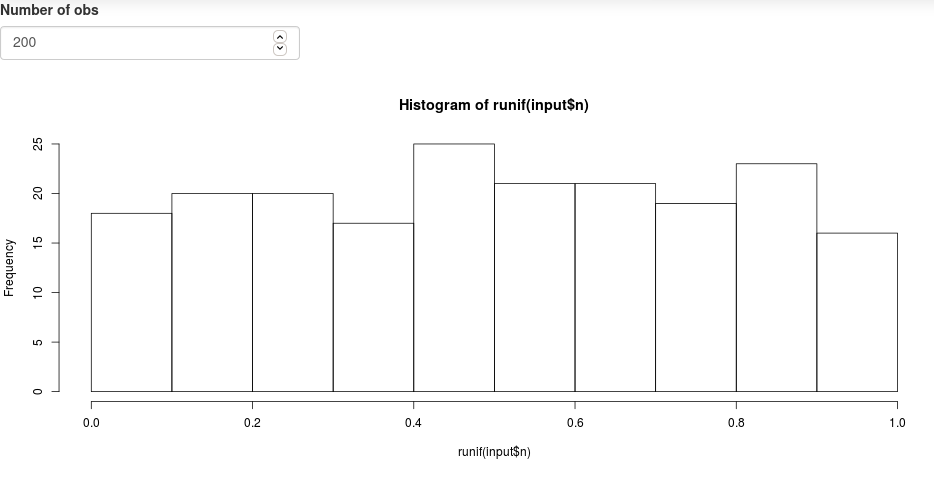 ] --- # Minimal Shiny App ## Structure - User interface object `ui`: - Controls layout and appearance of the app ( where to position the element to display) - Front end of the app - What the user sees and interacts with -- - Server function `server`: - Instructions sent to the computer/server running R to build the app - Back end of the application -- - A call to the shinyApp function `shinyApp(ui, server)` --- # Minimal Shiny App: `ui` <svg viewBox="0 0 576 512" style="height:1em;fill:currentColor;position:relative;display:inline-block;top:.1em;" xmlns="http://www.w3.org/2000/svg"> <path d="M288 144a110.94 110.94 0 0 0-31.24 5 55.4 55.4 0 0 1 7.24 27 56 56 0 0 1-56 56 55.4 55.4 0 0 1-27-7.24A111.71 111.71 0 1 0 288 144zm284.52 97.4C518.29 135.59 410.93 64 288 64S57.68 135.64 3.48 241.41a32.35 32.35 0 0 0 0 29.19C57.71 376.41 165.07 448 288 448s230.32-71.64 284.52-177.41a32.35 32.35 0 0 0 0-29.19zM288 400c-98.65 0-189.09-55-237.93-144C98.91 167 189.34 112 288 112s189.09 55 237.93 144C477.1 345 386.66 400 288 400z"></path></svg> ```r ui <- bootstrapPage( numericInput('n', 'Number of obs', n), plotOutput('plot') ) ``` -- 1. `ui` is the output of a function that creates a Shiny UI page (HTML), which defines the layout and its content. -- 2. layout: `bootstrapPage()` (see [Application layout guide](https://shiny.rstudio.com/articles/layout-guide.html)) -- 3. input: `numericInput()` (see [Control widget](https://shiny.rstudio.com/gallery/widget-gallery.html)) -- 4. output: `plotOutput()` (see [Display reactive output](https://shiny.rstudio.com/tutorial/written-tutorial/lesson4/)) -- 5. add HTML content with tags (see [Shiny HTML Tags Glossary](https://shiny.rstudio.com/articles/tag-glossary.html)) --- # Minimal Shiny App: `server` <svg viewBox="0 0 640 512" style="height:1em;fill:currentColor;position:relative;display:inline-block;top:.1em;" xmlns="http://www.w3.org/2000/svg"> <path d="M512.1 191l-8.2 14.3c-3 5.3-9.4 7.5-15.1 5.4-11.8-4.4-22.6-10.7-32.1-18.6-4.6-3.8-5.8-10.5-2.8-15.7l8.2-14.3c-6.9-8-12.3-17.3-15.9-27.4h-16.5c-6 0-11.2-4.3-12.2-10.3-2-12-2.1-24.6 0-37.1 1-6 6.2-10.4 12.2-10.4h16.5c3.6-10.1 9-19.4 15.9-27.4l-8.2-14.3c-3-5.2-1.9-11.9 2.8-15.7 9.5-7.9 20.4-14.2 32.1-18.6 5.7-2.1 12.1.1 15.1 5.4l8.2 14.3c10.5-1.9 21.2-1.9 31.7 0L552 6.3c3-5.3 9.4-7.5 15.1-5.4 11.8 4.4 22.6 10.7 32.1 18.6 4.6 3.8 5.8 10.5 2.8 15.7l-8.2 14.3c6.9 8 12.3 17.3 15.9 27.4h16.5c6 0 11.2 4.3 12.2 10.3 2 12 2.1 24.6 0 37.1-1 6-6.2 10.4-12.2 10.4h-16.5c-3.6 10.1-9 19.4-15.9 27.4l8.2 14.3c3 5.2 1.9 11.9-2.8 15.7-9.5 7.9-20.4 14.2-32.1 18.6-5.7 2.1-12.1-.1-15.1-5.4l-8.2-14.3c-10.4 1.9-21.2 1.9-31.7 0zm-10.5-58.8c38.5 29.6 82.4-14.3 52.8-52.8-38.5-29.7-82.4 14.3-52.8 52.8zM386.3 286.1l33.7 16.8c10.1 5.8 14.5 18.1 10.5 29.1-8.9 24.2-26.4 46.4-42.6 65.8-7.4 8.9-20.2 11.1-30.3 5.3l-29.1-16.8c-16 13.7-34.6 24.6-54.9 31.7v33.6c0 11.6-8.3 21.6-19.7 23.6-24.6 4.2-50.4 4.4-75.9 0-11.5-2-20-11.9-20-23.6V418c-20.3-7.2-38.9-18-54.9-31.7L74 403c-10 5.8-22.9 3.6-30.3-5.3-16.2-19.4-33.3-41.6-42.2-65.7-4-10.9.4-23.2 10.5-29.1l33.3-16.8c-3.9-20.9-3.9-42.4 0-63.4L12 205.8c-10.1-5.8-14.6-18.1-10.5-29 8.9-24.2 26-46.4 42.2-65.8 7.4-8.9 20.2-11.1 30.3-5.3l29.1 16.8c16-13.7 34.6-24.6 54.9-31.7V57.1c0-11.5 8.2-21.5 19.6-23.5 24.6-4.2 50.5-4.4 76-.1 11.5 2 20 11.9 20 23.6v33.6c20.3 7.2 38.9 18 54.9 31.7l29.1-16.8c10-5.8 22.9-3.6 30.3 5.3 16.2 19.4 33.2 41.6 42.1 65.8 4 10.9.1 23.2-10 29.1l-33.7 16.8c3.9 21 3.9 42.5 0 63.5zm-117.6 21.1c59.2-77-28.7-164.9-105.7-105.7-59.2 77 28.7 164.9 105.7 105.7zm243.4 182.7l-8.2 14.3c-3 5.3-9.4 7.5-15.1 5.4-11.8-4.4-22.6-10.7-32.1-18.6-4.6-3.8-5.8-10.5-2.8-15.7l8.2-14.3c-6.9-8-12.3-17.3-15.9-27.4h-16.5c-6 0-11.2-4.3-12.2-10.3-2-12-2.1-24.6 0-37.1 1-6 6.2-10.4 12.2-10.4h16.5c3.6-10.1 9-19.4 15.9-27.4l-8.2-14.3c-3-5.2-1.9-11.9 2.8-15.7 9.5-7.9 20.4-14.2 32.1-18.6 5.7-2.1 12.1.1 15.1 5.4l8.2 14.3c10.5-1.9 21.2-1.9 31.7 0l8.2-14.3c3-5.3 9.4-7.5 15.1-5.4 11.8 4.4 22.6 10.7 32.1 18.6 4.6 3.8 5.8 10.5 2.8 15.7l-8.2 14.3c6.9 8 12.3 17.3 15.9 27.4h16.5c6 0 11.2 4.3 12.2 10.3 2 12 2.1 24.6 0 37.1-1 6-6.2 10.4-12.2 10.4h-16.5c-3.6 10.1-9 19.4-15.9 27.4l8.2 14.3c3 5.2 1.9 11.9-2.8 15.7-9.5 7.9-20.4 14.2-32.1 18.6-5.7 2.1-12.1-.1-15.1-5.4l-8.2-14.3c-10.4 1.9-21.2 1.9-31.7 0zM501.6 431c38.5 29.6 82.4-14.3 52.8-52.8-38.5-29.6-82.4 14.3-52.8 52.8z"></path></svg> ```r server <- function(input, output) { output$plot <- renderPlot({ hist(runif(input$n)) }) } ``` -- 1. server is a function of `input` and `output` and optionally `session` (used latter, but not covered, see [Session object](https://shiny.rstudio.com/reference/shiny/1.6.0/session.html)) 2. process output: `renderPlot()` (see [Display reactive output](https://shiny.rstudio.com/tutorial/written-tutorial/lesson4/)) <svg viewBox="0 0 576 512" style="height:1em;fill:currentColor;position:relative;display:inline-block;top:.1em;" xmlns="http://www.w3.org/2000/svg"> <path d="M569.517 440.013C587.975 472.007 564.806 512 527.94 512H48.054c-36.937 0-59.999-40.055-41.577-71.987L246.423 23.985c18.467-32.009 64.72-31.951 83.154 0l239.94 416.028zM288 354c-25.405 0-46 20.595-46 46s20.595 46 46 46 46-20.595 46-46-20.595-46-46-46zm-43.673-165.346l7.418 136c.347 6.364 5.609 11.346 11.982 11.346h48.546c6.373 0 11.635-4.982 11.982-11.346l7.418-136c.375-6.874-5.098-12.654-11.982-12.654h-63.383c-6.884 0-12.356 5.78-11.981 12.654z"></path></svg> all `render*()` functions render reactive **output**, they capture R expressions and perform some light pre-processing to make the object suitable for the corresponding `*Output()` function in `ui`. --- # Minimal Shiny App: `server` <svg viewBox="0 0 640 512" style="height:1em;fill:currentColor;position:relative;display:inline-block;top:.1em;" xmlns="http://www.w3.org/2000/svg"> <path d="M512.1 191l-8.2 14.3c-3 5.3-9.4 7.5-15.1 5.4-11.8-4.4-22.6-10.7-32.1-18.6-4.6-3.8-5.8-10.5-2.8-15.7l8.2-14.3c-6.9-8-12.3-17.3-15.9-27.4h-16.5c-6 0-11.2-4.3-12.2-10.3-2-12-2.1-24.6 0-37.1 1-6 6.2-10.4 12.2-10.4h16.5c3.6-10.1 9-19.4 15.9-27.4l-8.2-14.3c-3-5.2-1.9-11.9 2.8-15.7 9.5-7.9 20.4-14.2 32.1-18.6 5.7-2.1 12.1.1 15.1 5.4l8.2 14.3c10.5-1.9 21.2-1.9 31.7 0L552 6.3c3-5.3 9.4-7.5 15.1-5.4 11.8 4.4 22.6 10.7 32.1 18.6 4.6 3.8 5.8 10.5 2.8 15.7l-8.2 14.3c6.9 8 12.3 17.3 15.9 27.4h16.5c6 0 11.2 4.3 12.2 10.3 2 12 2.1 24.6 0 37.1-1 6-6.2 10.4-12.2 10.4h-16.5c-3.6 10.1-9 19.4-15.9 27.4l8.2 14.3c3 5.2 1.9 11.9-2.8 15.7-9.5 7.9-20.4 14.2-32.1 18.6-5.7 2.1-12.1-.1-15.1-5.4l-8.2-14.3c-10.4 1.9-21.2 1.9-31.7 0zm-10.5-58.8c38.5 29.6 82.4-14.3 52.8-52.8-38.5-29.7-82.4 14.3-52.8 52.8zM386.3 286.1l33.7 16.8c10.1 5.8 14.5 18.1 10.5 29.1-8.9 24.2-26.4 46.4-42.6 65.8-7.4 8.9-20.2 11.1-30.3 5.3l-29.1-16.8c-16 13.7-34.6 24.6-54.9 31.7v33.6c0 11.6-8.3 21.6-19.7 23.6-24.6 4.2-50.4 4.4-75.9 0-11.5-2-20-11.9-20-23.6V418c-20.3-7.2-38.9-18-54.9-31.7L74 403c-10 5.8-22.9 3.6-30.3-5.3-16.2-19.4-33.3-41.6-42.2-65.7-4-10.9.4-23.2 10.5-29.1l33.3-16.8c-3.9-20.9-3.9-42.4 0-63.4L12 205.8c-10.1-5.8-14.6-18.1-10.5-29 8.9-24.2 26-46.4 42.2-65.8 7.4-8.9 20.2-11.1 30.3-5.3l29.1 16.8c16-13.7 34.6-24.6 54.9-31.7V57.1c0-11.5 8.2-21.5 19.6-23.5 24.6-4.2 50.5-4.4 76-.1 11.5 2 20 11.9 20 23.6v33.6c20.3 7.2 38.9 18 54.9 31.7l29.1-16.8c10-5.8 22.9-3.6 30.3 5.3 16.2 19.4 33.2 41.6 42.1 65.8 4 10.9.1 23.2-10 29.1l-33.7 16.8c3.9 21 3.9 42.5 0 63.5zm-117.6 21.1c59.2-77-28.7-164.9-105.7-105.7-59.2 77 28.7 164.9 105.7 105.7zm243.4 182.7l-8.2 14.3c-3 5.3-9.4 7.5-15.1 5.4-11.8-4.4-22.6-10.7-32.1-18.6-4.6-3.8-5.8-10.5-2.8-15.7l8.2-14.3c-6.9-8-12.3-17.3-15.9-27.4h-16.5c-6 0-11.2-4.3-12.2-10.3-2-12-2.1-24.6 0-37.1 1-6 6.2-10.4 12.2-10.4h16.5c3.6-10.1 9-19.4 15.9-27.4l-8.2-14.3c-3-5.2-1.9-11.9 2.8-15.7 9.5-7.9 20.4-14.2 32.1-18.6 5.7-2.1 12.1.1 15.1 5.4l8.2 14.3c10.5-1.9 21.2-1.9 31.7 0l8.2-14.3c3-5.3 9.4-7.5 15.1-5.4 11.8 4.4 22.6 10.7 32.1 18.6 4.6 3.8 5.8 10.5 2.8 15.7l-8.2 14.3c6.9 8 12.3 17.3 15.9 27.4h16.5c6 0 11.2 4.3 12.2 10.3 2 12 2.1 24.6 0 37.1-1 6-6.2 10.4-12.2 10.4h-16.5c-3.6 10.1-9 19.4-15.9 27.4l8.2 14.3c3 5.2 1.9 11.9-2.8 15.7-9.5 7.9-20.4 14.2-32.1 18.6-5.7 2.1-12.1-.1-15.1-5.4l-8.2-14.3c-10.4 1.9-21.2 1.9-31.7 0zM501.6 431c38.5 29.6 82.4-14.3 52.8-52.8-38.5-29.6-82.4 14.3-52.8 52.8z"></path></svg> ## [Reactive output](https://shiny.rstudio.com/tutorial/written-tutorial/lesson4/) .font90[ | Output function (`ui`) | Render function (`server`) | Creates | | :--------------------- | :------------------------- | :-----------| | `dataTableOutput` | `renderDataTable()` | DataTable | | `htmlOutput` | `renderImage()` | raw HTML | | `imageOutput` | `renderImage()` | image | | `plotOutput` | `renderPlot()` | plot | | `tableOutput` | `renderTable()` | table | | `textOutput` | `renderText()` | text | | `uiOutput` | `renderUI()` | raw HTML | | `verbatimTextOutput` | `renderVerbatimText()` | text | ] --- # Minimal Shiny App: run the app ```r shinyApp(ui = ui, server = server) ``` <svg viewBox="0 0 640 512" style="height:1em;fill:currentColor;position:relative;display:inline-block;top:.1em;" xmlns="http://www.w3.org/2000/svg"> <path d="M255.03 261.65c6.25 6.25 16.38 6.25 22.63 0l11.31-11.31c6.25-6.25 6.25-16.38 0-22.63L253.25 192l35.71-35.72c6.25-6.25 6.25-16.38 0-22.63l-11.31-11.31c-6.25-6.25-16.38-6.25-22.63 0l-58.34 58.34c-6.25 6.25-6.25 16.38 0 22.63l58.35 58.34zm96.01-11.3l11.31 11.31c6.25 6.25 16.38 6.25 22.63 0l58.34-58.34c6.25-6.25 6.25-16.38 0-22.63l-58.34-58.34c-6.25-6.25-16.38-6.25-22.63 0l-11.31 11.31c-6.25 6.25-6.25 16.38 0 22.63L386.75 192l-35.71 35.72c-6.25 6.25-6.25 16.38 0 22.63zM624 416H381.54c-.74 19.81-14.71 32-32.74 32H288c-18.69 0-33.02-17.47-32.77-32H16c-8.8 0-16 7.2-16 16v16c0 35.2 28.8 64 64 64h512c35.2 0 64-28.8 64-64v-16c0-8.8-7.2-16-16-16zM576 48c0-26.4-21.6-48-48-48H112C85.6 0 64 21.6 64 48v336h512V48zm-64 272H128V64h384v256z"></path></svg> Trigger the application. -- There are several ways to do so, see [App formats and launching apps](https://shiny.rstudio.com/articles/app-formats.html). --- # Minimal Shiny App: community - As often with <svg viewBox="0 0 581 512" style="height:1em;fill:currentColor;position:relative;display:inline-block;top:.1em;" xmlns="http://www.w3.org/2000/svg"> <path d="M581 226.6C581 119.1 450.9 32 290.5 32S0 119.1 0 226.6C0 322.4 103.3 402 239.4 418.1V480h99.1v-61.5c24.3-2.7 47.6-7.4 69.4-13.9L448 480h112l-67.4-113.7c54.5-35.4 88.4-84.9 88.4-139.7zm-466.8 14.5c0-73.5 98.9-133 220.8-133s211.9 40.7 211.9 133c0 50.1-26.5 85-70.3 106.4-2.4-1.6-4.7-2.9-6.4-3.7-10.2-5.2-27.8-10.5-27.8-10.5s86.6-6.4 86.6-92.7-90.6-87.9-90.6-87.9h-199V361c-74.1-21.5-125.2-67.1-125.2-119.9zm225.1 38.3v-55.6c57.8 0 87.8-6.8 87.8 27.3 0 36.5-38.2 28.3-87.8 28.3zm-.9 72.5H365c10.8 0 18.9 11.7 24 19.2-16.1 1.9-33 2.8-50.6 2.9v-22.1z"></path></svg>, one of the major strength is the community: -- - academics / researchers - growing bigger and bigger </br> -- - List of resources: [awesome-shiny-extensions](https://github.com/nanxstats/awesome-shiny-extensions) --- # Interactive Atlas with shiny App ### Goals - Let's use `cdqs.csv` see (https://github.com/inSilecoInc/wksh_raster_CWS/tree/main/data) - Do a map per species ### We'll use * Let's use a `Fluidpage` and a `sidebarLayout()` that will include a side panel and a main panel. * in the side panel we'll have user inputs. * in the main panel we'll have maps/plots. --- # Interactive Atlas with shiny App: `ui` <svg viewBox="0 0 576 512" style="height:1em;fill:currentColor;position:relative;display:inline-block;top:.1em;" xmlns="http://www.w3.org/2000/svg"> <path d="M288 144a110.94 110.94 0 0 0-31.24 5 55.4 55.4 0 0 1 7.24 27 56 56 0 0 1-56 56 55.4 55.4 0 0 1-27-7.24A111.71 111.71 0 1 0 288 144zm284.52 97.4C518.29 135.59 410.93 64 288 64S57.68 135.64 3.48 241.41a32.35 32.35 0 0 0 0 29.19C57.71 376.41 165.07 448 288 448s230.32-71.64 284.52-177.41a32.35 32.35 0 0 0 0-29.19zM288 400c-98.65 0-189.09-55-237.93-144C98.91 167 189.34 112 288 112s189.09 55 237.93 144C477.1 345 386.66 400 288 400z"></path></svg> ```r ui <- fluidPage( sidebarLayout( sidebarPanel( h1("Sidebar"), p("This is our sidebar where inputs will be added.") ), mainPanel( h1("Main Panel"), p("This is where outputs will be added.") ) ) ) ``` -- To check what this gives, once `ui` is loaded, run the following: ```r server <- function(input, output) NULL shinyApp(ui = ui, server = server) ``` ??? comma are IMPORTANT --- # Interactive Atlas with shiny App: `ui` <svg viewBox="0 0 576 512" style="height:1em;fill:currentColor;position:relative;display:inline-block;top:.1em;" xmlns="http://www.w3.org/2000/svg"> <path d="M288 144a110.94 110.94 0 0 0-31.24 5 55.4 55.4 0 0 1 7.24 27 56 56 0 0 1-56 56 55.4 55.4 0 0 1-27-7.24A111.71 111.71 0 1 0 288 144zm284.52 97.4C518.29 135.59 410.93 64 288 64S57.68 135.64 3.48 241.41a32.35 32.35 0 0 0 0 29.19C57.71 376.41 165.07 448 288 448s230.32-71.64 284.52-177.41a32.35 32.35 0 0 0 0-29.19zM288 400c-98.65 0-189.09-55-237.93-144C98.91 167 189.34 112 288 112s189.09 55 237.93 144C477.1 345 386.66 400 288 400z"></path></svg> ```r ui <- fluidPage( sidebarLayout( sidebarPanel( h1("Sidebar"), selectInput(inputId = "species", label = "Select species", choices = "placeholder") # input$species ), mainPanel( h1("Main Panel"), plotOutput("map", width = "100%") ) ) ) ``` --- # Interactive Atlas with shiny App: `server` <svg viewBox="0 0 640 512" style="height:1em;fill:currentColor;position:relative;display:inline-block;top:.1em;" xmlns="http://www.w3.org/2000/svg"> <path d="M512.1 191l-8.2 14.3c-3 5.3-9.4 7.5-15.1 5.4-11.8-4.4-22.6-10.7-32.1-18.6-4.6-3.8-5.8-10.5-2.8-15.7l8.2-14.3c-6.9-8-12.3-17.3-15.9-27.4h-16.5c-6 0-11.2-4.3-12.2-10.3-2-12-2.1-24.6 0-37.1 1-6 6.2-10.4 12.2-10.4h16.5c3.6-10.1 9-19.4 15.9-27.4l-8.2-14.3c-3-5.2-1.9-11.9 2.8-15.7 9.5-7.9 20.4-14.2 32.1-18.6 5.7-2.1 12.1.1 15.1 5.4l8.2 14.3c10.5-1.9 21.2-1.9 31.7 0L552 6.3c3-5.3 9.4-7.5 15.1-5.4 11.8 4.4 22.6 10.7 32.1 18.6 4.6 3.8 5.8 10.5 2.8 15.7l-8.2 14.3c6.9 8 12.3 17.3 15.9 27.4h16.5c6 0 11.2 4.3 12.2 10.3 2 12 2.1 24.6 0 37.1-1 6-6.2 10.4-12.2 10.4h-16.5c-3.6 10.1-9 19.4-15.9 27.4l8.2 14.3c3 5.2 1.9 11.9-2.8 15.7-9.5 7.9-20.4 14.2-32.1 18.6-5.7 2.1-12.1-.1-15.1-5.4l-8.2-14.3c-10.4 1.9-21.2 1.9-31.7 0zm-10.5-58.8c38.5 29.6 82.4-14.3 52.8-52.8-38.5-29.7-82.4 14.3-52.8 52.8zM386.3 286.1l33.7 16.8c10.1 5.8 14.5 18.1 10.5 29.1-8.9 24.2-26.4 46.4-42.6 65.8-7.4 8.9-20.2 11.1-30.3 5.3l-29.1-16.8c-16 13.7-34.6 24.6-54.9 31.7v33.6c0 11.6-8.3 21.6-19.7 23.6-24.6 4.2-50.4 4.4-75.9 0-11.5-2-20-11.9-20-23.6V418c-20.3-7.2-38.9-18-54.9-31.7L74 403c-10 5.8-22.9 3.6-30.3-5.3-16.2-19.4-33.3-41.6-42.2-65.7-4-10.9.4-23.2 10.5-29.1l33.3-16.8c-3.9-20.9-3.9-42.4 0-63.4L12 205.8c-10.1-5.8-14.6-18.1-10.5-29 8.9-24.2 26-46.4 42.2-65.8 7.4-8.9 20.2-11.1 30.3-5.3l29.1 16.8c16-13.7 34.6-24.6 54.9-31.7V57.1c0-11.5 8.2-21.5 19.6-23.5 24.6-4.2 50.5-4.4 76-.1 11.5 2 20 11.9 20 23.6v33.6c20.3 7.2 38.9 18 54.9 31.7l29.1-16.8c10-5.8 22.9-3.6 30.3 5.3 16.2 19.4 33.2 41.6 42.1 65.8 4 10.9.1 23.2-10 29.1l-33.7 16.8c3.9 21 3.9 42.5 0 63.5zm-117.6 21.1c59.2-77-28.7-164.9-105.7-105.7-59.2 77 28.7 164.9 105.7 105.7zm243.4 182.7l-8.2 14.3c-3 5.3-9.4 7.5-15.1 5.4-11.8-4.4-22.6-10.7-32.1-18.6-4.6-3.8-5.8-10.5-2.8-15.7l8.2-14.3c-6.9-8-12.3-17.3-15.9-27.4h-16.5c-6 0-11.2-4.3-12.2-10.3-2-12-2.1-24.6 0-37.1 1-6 6.2-10.4 12.2-10.4h16.5c3.6-10.1 9-19.4 15.9-27.4l-8.2-14.3c-3-5.2-1.9-11.9 2.8-15.7 9.5-7.9 20.4-14.2 32.1-18.6 5.7-2.1 12.1.1 15.1 5.4l8.2 14.3c10.5-1.9 21.2-1.9 31.7 0l8.2-14.3c3-5.3 9.4-7.5 15.1-5.4 11.8 4.4 22.6 10.7 32.1 18.6 4.6 3.8 5.8 10.5 2.8 15.7l-8.2 14.3c6.9 8 12.3 17.3 15.9 27.4h16.5c6 0 11.2 4.3 12.2 10.3 2 12 2.1 24.6 0 37.1-1 6-6.2 10.4-12.2 10.4h-16.5c-3.6 10.1-9 19.4-15.9 27.4l8.2 14.3c3 5.2 1.9 11.9-2.8 15.7-9.5 7.9-20.4 14.2-32.1 18.6-5.7 2.1-12.1-.1-15.1-5.4l-8.2-14.3c-10.4 1.9-21.2 1.9-31.7 0zM501.6 431c38.5 29.6 82.4-14.3 52.8-52.8-38.5-29.6-82.4 14.3-52.8 52.8z"></path></svg> ```r library(sf) library(dplyr) server <- function(input, output) { cdqs <- st_as_sf(x = read.csv('output/CDQS_BIOMQ_2017.csv'), coords = c("CentroideX", "CentroideY"), crs = 4326) print(names(cdqs)) } ``` ??? Server ===> data will need to be on a SERVER a remote computer --- # Interactive Atlas with shiny App: `server` <svg viewBox="0 0 640 512" style="height:1em;fill:currentColor;position:relative;display:inline-block;top:.1em;" xmlns="http://www.w3.org/2000/svg"> <path d="M512.1 191l-8.2 14.3c-3 5.3-9.4 7.5-15.1 5.4-11.8-4.4-22.6-10.7-32.1-18.6-4.6-3.8-5.8-10.5-2.8-15.7l8.2-14.3c-6.9-8-12.3-17.3-15.9-27.4h-16.5c-6 0-11.2-4.3-12.2-10.3-2-12-2.1-24.6 0-37.1 1-6 6.2-10.4 12.2-10.4h16.5c3.6-10.1 9-19.4 15.9-27.4l-8.2-14.3c-3-5.2-1.9-11.9 2.8-15.7 9.5-7.9 20.4-14.2 32.1-18.6 5.7-2.1 12.1.1 15.1 5.4l8.2 14.3c10.5-1.9 21.2-1.9 31.7 0L552 6.3c3-5.3 9.4-7.5 15.1-5.4 11.8 4.4 22.6 10.7 32.1 18.6 4.6 3.8 5.8 10.5 2.8 15.7l-8.2 14.3c6.9 8 12.3 17.3 15.9 27.4h16.5c6 0 11.2 4.3 12.2 10.3 2 12 2.1 24.6 0 37.1-1 6-6.2 10.4-12.2 10.4h-16.5c-3.6 10.1-9 19.4-15.9 27.4l8.2 14.3c3 5.2 1.9 11.9-2.8 15.7-9.5 7.9-20.4 14.2-32.1 18.6-5.7 2.1-12.1-.1-15.1-5.4l-8.2-14.3c-10.4 1.9-21.2 1.9-31.7 0zm-10.5-58.8c38.5 29.6 82.4-14.3 52.8-52.8-38.5-29.7-82.4 14.3-52.8 52.8zM386.3 286.1l33.7 16.8c10.1 5.8 14.5 18.1 10.5 29.1-8.9 24.2-26.4 46.4-42.6 65.8-7.4 8.9-20.2 11.1-30.3 5.3l-29.1-16.8c-16 13.7-34.6 24.6-54.9 31.7v33.6c0 11.6-8.3 21.6-19.7 23.6-24.6 4.2-50.4 4.4-75.9 0-11.5-2-20-11.9-20-23.6V418c-20.3-7.2-38.9-18-54.9-31.7L74 403c-10 5.8-22.9 3.6-30.3-5.3-16.2-19.4-33.3-41.6-42.2-65.7-4-10.9.4-23.2 10.5-29.1l33.3-16.8c-3.9-20.9-3.9-42.4 0-63.4L12 205.8c-10.1-5.8-14.6-18.1-10.5-29 8.9-24.2 26-46.4 42.2-65.8 7.4-8.9 20.2-11.1 30.3-5.3l29.1 16.8c16-13.7 34.6-24.6 54.9-31.7V57.1c0-11.5 8.2-21.5 19.6-23.5 24.6-4.2 50.5-4.4 76-.1 11.5 2 20 11.9 20 23.6v33.6c20.3 7.2 38.9 18 54.9 31.7l29.1-16.8c10-5.8 22.9-3.6 30.3 5.3 16.2 19.4 33.2 41.6 42.1 65.8 4 10.9.1 23.2-10 29.1l-33.7 16.8c3.9 21 3.9 42.5 0 63.5zm-117.6 21.1c59.2-77-28.7-164.9-105.7-105.7-59.2 77 28.7 164.9 105.7 105.7zm243.4 182.7l-8.2 14.3c-3 5.3-9.4 7.5-15.1 5.4-11.8-4.4-22.6-10.7-32.1-18.6-4.6-3.8-5.8-10.5-2.8-15.7l8.2-14.3c-6.9-8-12.3-17.3-15.9-27.4h-16.5c-6 0-11.2-4.3-12.2-10.3-2-12-2.1-24.6 0-37.1 1-6 6.2-10.4 12.2-10.4h16.5c3.6-10.1 9-19.4 15.9-27.4l-8.2-14.3c-3-5.2-1.9-11.9 2.8-15.7 9.5-7.9 20.4-14.2 32.1-18.6 5.7-2.1 12.1.1 15.1 5.4l8.2 14.3c10.5-1.9 21.2-1.9 31.7 0l8.2-14.3c3-5.3 9.4-7.5 15.1-5.4 11.8 4.4 22.6 10.7 32.1 18.6 4.6 3.8 5.8 10.5 2.8 15.7l-8.2 14.3c6.9 8 12.3 17.3 15.9 27.4h16.5c6 0 11.2 4.3 12.2 10.3 2 12 2.1 24.6 0 37.1-1 6-6.2 10.4-12.2 10.4h-16.5c-3.6 10.1-9 19.4-15.9 27.4l8.2 14.3c3 5.2 1.9 11.9-2.8 15.7-9.5 7.9-20.4 14.2-32.1 18.6-5.7 2.1-12.1-.1-15.1-5.4l-8.2-14.3c-10.4 1.9-21.2 1.9-31.7 0zM501.6 431c38.5 29.6 82.4-14.3 52.8-52.8-38.5-29.6-82.4 14.3-52.8 52.8z"></path></svg> ```r library(sf) library(dplyr) cdqs <- st_as_sf(x = read.csv('output/CDQS_BIOMQ_2017.csv'), coords = c("CentroideX", "CentroideY"), crs = 4326) sl <- st_read("data/st_laurence.geojson") server <- function(input, output, session) { updateSelectInput(session, "species", choices = unique(cdqs$Espece.Species.EN)) } ``` -- ## Run the app --- # Interactive Atlas with shiny App: `server` <svg viewBox="0 0 640 512" style="height:1em;fill:currentColor;position:relative;display:inline-block;top:.1em;" xmlns="http://www.w3.org/2000/svg"> <path d="M512.1 191l-8.2 14.3c-3 5.3-9.4 7.5-15.1 5.4-11.8-4.4-22.6-10.7-32.1-18.6-4.6-3.8-5.8-10.5-2.8-15.7l8.2-14.3c-6.9-8-12.3-17.3-15.9-27.4h-16.5c-6 0-11.2-4.3-12.2-10.3-2-12-2.1-24.6 0-37.1 1-6 6.2-10.4 12.2-10.4h16.5c3.6-10.1 9-19.4 15.9-27.4l-8.2-14.3c-3-5.2-1.9-11.9 2.8-15.7 9.5-7.9 20.4-14.2 32.1-18.6 5.7-2.1 12.1.1 15.1 5.4l8.2 14.3c10.5-1.9 21.2-1.9 31.7 0L552 6.3c3-5.3 9.4-7.5 15.1-5.4 11.8 4.4 22.6 10.7 32.1 18.6 4.6 3.8 5.8 10.5 2.8 15.7l-8.2 14.3c6.9 8 12.3 17.3 15.9 27.4h16.5c6 0 11.2 4.3 12.2 10.3 2 12 2.1 24.6 0 37.1-1 6-6.2 10.4-12.2 10.4h-16.5c-3.6 10.1-9 19.4-15.9 27.4l8.2 14.3c3 5.2 1.9 11.9-2.8 15.7-9.5 7.9-20.4 14.2-32.1 18.6-5.7 2.1-12.1-.1-15.1-5.4l-8.2-14.3c-10.4 1.9-21.2 1.9-31.7 0zm-10.5-58.8c38.5 29.6 82.4-14.3 52.8-52.8-38.5-29.7-82.4 14.3-52.8 52.8zM386.3 286.1l33.7 16.8c10.1 5.8 14.5 18.1 10.5 29.1-8.9 24.2-26.4 46.4-42.6 65.8-7.4 8.9-20.2 11.1-30.3 5.3l-29.1-16.8c-16 13.7-34.6 24.6-54.9 31.7v33.6c0 11.6-8.3 21.6-19.7 23.6-24.6 4.2-50.4 4.4-75.9 0-11.5-2-20-11.9-20-23.6V418c-20.3-7.2-38.9-18-54.9-31.7L74 403c-10 5.8-22.9 3.6-30.3-5.3-16.2-19.4-33.3-41.6-42.2-65.7-4-10.9.4-23.2 10.5-29.1l33.3-16.8c-3.9-20.9-3.9-42.4 0-63.4L12 205.8c-10.1-5.8-14.6-18.1-10.5-29 8.9-24.2 26-46.4 42.2-65.8 7.4-8.9 20.2-11.1 30.3-5.3l29.1 16.8c16-13.7 34.6-24.6 54.9-31.7V57.1c0-11.5 8.2-21.5 19.6-23.5 24.6-4.2 50.5-4.4 76-.1 11.5 2 20 11.9 20 23.6v33.6c20.3 7.2 38.9 18 54.9 31.7l29.1-16.8c10-5.8 22.9-3.6 30.3 5.3 16.2 19.4 33.2 41.6 42.1 65.8 4 10.9.1 23.2-10 29.1l-33.7 16.8c3.9 21 3.9 42.5 0 63.5zm-117.6 21.1c59.2-77-28.7-164.9-105.7-105.7-59.2 77 28.7 164.9 105.7 105.7zm243.4 182.7l-8.2 14.3c-3 5.3-9.4 7.5-15.1 5.4-11.8-4.4-22.6-10.7-32.1-18.6-4.6-3.8-5.8-10.5-2.8-15.7l8.2-14.3c-6.9-8-12.3-17.3-15.9-27.4h-16.5c-6 0-11.2-4.3-12.2-10.3-2-12-2.1-24.6 0-37.1 1-6 6.2-10.4 12.2-10.4h16.5c3.6-10.1 9-19.4 15.9-27.4l-8.2-14.3c-3-5.2-1.9-11.9 2.8-15.7 9.5-7.9 20.4-14.2 32.1-18.6 5.7-2.1 12.1.1 15.1 5.4l8.2 14.3c10.5-1.9 21.2-1.9 31.7 0l8.2-14.3c3-5.3 9.4-7.5 15.1-5.4 11.8 4.4 22.6 10.7 32.1 18.6 4.6 3.8 5.8 10.5 2.8 15.7l-8.2 14.3c6.9 8 12.3 17.3 15.9 27.4h16.5c6 0 11.2 4.3 12.2 10.3 2 12 2.1 24.6 0 37.1-1 6-6.2 10.4-12.2 10.4h-16.5c-3.6 10.1-9 19.4-15.9 27.4l8.2 14.3c3 5.2 1.9 11.9-2.8 15.7-9.5 7.9-20.4 14.2-32.1 18.6-5.7 2.1-12.1-.1-15.1-5.4l-8.2-14.3c-10.4 1.9-21.2 1.9-31.7 0zM501.6 431c38.5 29.6 82.4-14.3 52.8-52.8-38.5-29.6-82.4 14.3-52.8 52.8z"></path></svg> ```r library(sf) library(dplyr) cdqs <- st_as_sf(x = read.csv('output/CDQS_BIOMQ_2017.csv'), coords = c("CentroideX", "CentroideY"), crs = 4326) server <- function(input, output, session) { updateSelectInput(session, "species", choices = unique(cdqs$Espece.Species.EN)) output$map <- renderPlot({ plot(st_geometry(sl), border = "grey50") cdqs %>% filter(Espece.Species.EN == !!input$species) %>% st_geometry() %>% plot(add = TRUE, pch = 19) }) } ``` -- ## Run the app --- # 1 App 1 Folder ### atlasv1 [<svg viewBox="0 0 512 512" style="height:1em;fill:currentColor;position:relative;display:inline-block;top:.1em;" xmlns="http://www.w3.org/2000/svg"> <path d="M464 128H272l-54.63-54.63c-6-6-14.14-9.37-22.63-9.37H48C21.49 64 0 85.49 0 112v288c0 26.51 21.49 48 48 48h416c26.51 0 48-21.49 48-48V176c0-26.51-21.49-48-48-48zm0 272H48V112h140.12l54.63 54.63c6 6 14.14 9.37 22.63 9.37H464v224z"></path></svg>](https://github.com/inSilecoInc/wksh_raster_CWS/raw/gh-pages/demo/atlasv1.zip) --- class: inverse, center, middle # <svg viewBox="0 0 512 512" style="height:1em;fill:currentColor;position:relative;display:inline-block;top:.1em;" xmlns="http://www.w3.org/2000/svg"> <path d="M256 8C119.043 8 8 119.083 8 256c0 136.997 111.043 248 248 248s248-111.003 248-248C504 119.083 392.957 8 256 8zm0 110c23.196 0 42 18.804 42 42s-18.804 42-42 42-42-18.804-42-42 18.804-42 42-42zm56 254c0 6.627-5.373 12-12 12h-88c-6.627 0-12-5.373-12-12v-24c0-6.627 5.373-12 12-12h12v-64h-12c-6.627 0-12-5.373-12-12v-24c0-6.627 5.373-12 12-12h64c6.627 0 12 5.373 12 12v100h12c6.627 0 12 5.373 12 12v24z"></path></svg> Exercise ![:custom_hr]() ## <svg viewBox="0 0 512 512" style="height:1em;fill:currentColor;position:relative;display:inline-block;top:.1em;" xmlns="http://www.w3.org/2000/svg"> <path d="M256 8C119 8 8 119 8 256s111 248 248 248 248-111 248-248S393 8 256 8zm0 448c-110.5 0-200-89.5-200-200S145.5 56 256 56s200 89.5 200 200-89.5 200-200 200zm61.8-104.4l-84.9-61.7c-3.1-2.3-4.9-5.9-4.9-9.7V116c0-6.6 5.4-12 12-12h32c6.6 0 12 5.4 12 12v141.7l66.8 48.6c5.4 3.9 6.5 11.4 2.6 16.8L334.6 349c-3.9 5.3-11.4 6.5-16.8 2.6z"></path></svg> ~40min --- # Interactive Atlas with shiny App ## Keep adding features to your interactive Atlas! -- ### Examples: - Improve the map - Add filters e.g. colony name 1. replace species filter by a colony filter 2. double filter species/colony - Add a button save <div class="countdown" id="timer_605bbc68" style="right:0;bottom:0;" data-warnwhen="0"> <code class="countdown-time"><span class="countdown-digits minutes">40</span><span class="countdown-digits colon">:</span><span class="countdown-digits seconds">00</span></code> </div> --- # Solution: * the folder `data/` should include : `bathy.tif`, `cdqs.csv` and `st_laurence.geojson` * for the code, see https://raw.githubusercontent.com/inSilecoInc/wksh_raster_CWS/main/scripts/_sol_shiny1.R --- class: inverse, center, middle # <svg viewBox="0 0 512 512" style="height:1em;fill:currentColor;position:relative;display:inline-block;top:.1em;" xmlns="http://www.w3.org/2000/svg"> <path d="M256 8C119.043 8 8 119.083 8 256c0 136.997 111.043 248 248 248s248-111.003 248-248C504 119.083 392.957 8 256 8zm0 110c23.196 0 42 18.804 42 42s-18.804 42-42 42-42-18.804-42-42 18.804-42 42-42zm56 254c0 6.627-5.373 12-12 12h-88c-6.627 0-12-5.373-12-12v-24c0-6.627 5.373-12 12-12h12v-64h-12c-6.627 0-12-5.373-12-12v-24c0-6.627 5.373-12 12-12h64c6.627 0 12 5.373 12 12v100h12c6.627 0 12 5.373 12 12v24z"></path></svg> Spatial Shiny Apps ![:custom_hr]() ## <svg viewBox="0 0 512 512" style="height:1em;fill:currentColor;position:relative;display:inline-block;top:.1em;" xmlns="http://www.w3.org/2000/svg"> <path d="M256 8C119 8 8 119 8 256s111 248 248 248 248-111 248-248S393 8 256 8zm0 448c-110.5 0-200-89.5-200-200S145.5 56 256 56s200 89.5 200 200-89.5 200-200 200zm61.8-104.4l-84.9-61.7c-3.1-2.3-4.9-5.9-4.9-9.7V116c0-6.6 5.4-12 12-12h32c6.6 0 12 5.4 12 12v141.7l66.8 48.6c5.4 3.9 6.5 11.4 2.6 16.8L334.6 349c-3.9 5.3-11.4 6.5-16.8 2.6z"></path></svg> ~20min --- # Spatial Features - Any <svg viewBox="0 0 581 512" style="height:1em;fill:currentColor;position:relative;display:inline-block;top:.1em;" xmlns="http://www.w3.org/2000/svg"> <path d="M581 226.6C581 119.1 450.9 32 290.5 32S0 119.1 0 226.6C0 322.4 103.3 402 239.4 418.1V480h99.1v-61.5c24.3-2.7 47.6-7.4 69.4-13.9L448 480h112l-67.4-113.7c54.5-35.4 88.4-84.9 88.4-139.7zm-466.8 14.5c0-73.5 98.9-133 220.8-133s211.9 40.7 211.9 133c0 50.1-26.5 85-70.3 106.4-2.4-1.6-4.7-2.9-6.4-3.7-10.2-5.2-27.8-10.5-27.8-10.5s86.6-6.4 86.6-92.7-90.6-87.9-90.6-87.9h-199V361c-74.1-21.5-125.2-67.1-125.2-119.9zm225.1 38.3v-55.6c57.8 0 87.8-6.8 87.8 27.3 0 36.5-38.2 28.3-87.8 28.3zm-.9 72.5H365c10.8 0 18.9 11.7 24 19.2-16.1 1.9-33 2.8-50.6 2.9v-22.1z"></path></svg> packages can be used to do computation. -- - Special output for `leaflet` -- - special module in [`mapedit`](https://github.com/r-spatial/mapedit) --- # [Reactive output](https://shiny.rstudio.com/tutorial/written-tutorial/lesson4/) .font90[ | Output function (`ui`) | Render function (`server`) | Creates | | :--------------------- | :------------------------- | :-----------| | `dataTableOutput` | `renderDataTable()` | DataTable | | `htmlOutput` | `renderImage()` | raw HTML | | `imageOutput` | `renderImage()` | image | | `plotOutput` | `renderPlot()` | plot | | `tableOutput` | `renderTable()` | table | | `textOutput` | `renderText()` | text | | `uiOutput` | `renderUI()` | raw HTML | | `verbatimTextOutput` | `renderVerbatimText()` | text | | `leafletOutput()` | `renderLeaflet()` | leaflet map | ] --- # Spatial Shiny App: `ui` <svg viewBox="0 0 576 512" style="height:1em;fill:currentColor;position:relative;display:inline-block;top:.1em;" xmlns="http://www.w3.org/2000/svg"> <path d="M288 144a110.94 110.94 0 0 0-31.24 5 55.4 55.4 0 0 1 7.24 27 56 56 0 0 1-56 56 55.4 55.4 0 0 1-27-7.24A111.71 111.71 0 1 0 288 144zm284.52 97.4C518.29 135.59 410.93 64 288 64S57.68 135.64 3.48 241.41a32.35 32.35 0 0 0 0 29.19C57.71 376.41 165.07 448 288 448s230.32-71.64 284.52-177.41a32.35 32.35 0 0 0 0-29.19zM288 400c-98.65 0-189.09-55-237.93-144C98.91 167 189.34 112 288 112s189.09 55 237.93 144C477.1 345 386.66 400 288 400z"></path></svg> ### Previously ```r ui <- fluidPage( sidebarLayout( sidebarPanel( h1("Sidebar"), selectInput(inputId = "species", label = "Select species", choices = "placeholder") ), mainPanel( h1("Main Panel"), plotOutput("map", width = "100%") ) ) ) ``` --- # Spatial Shiny App: `ui` <svg viewBox="0 0 576 512" style="height:1em;fill:currentColor;position:relative;display:inline-block;top:.1em;" xmlns="http://www.w3.org/2000/svg"> <path d="M288 144a110.94 110.94 0 0 0-31.24 5 55.4 55.4 0 0 1 7.24 27 56 56 0 0 1-56 56 55.4 55.4 0 0 1-27-7.24A111.71 111.71 0 1 0 288 144zm284.52 97.4C518.29 135.59 410.93 64 288 64S57.68 135.64 3.48 241.41a32.35 32.35 0 0 0 0 29.19C57.71 376.41 165.07 448 288 448s230.32-71.64 284.52-177.41a32.35 32.35 0 0 0 0-29.19zM288 400c-98.65 0-189.09-55-237.93-144C98.91 167 189.34 112 288 112s189.09 55 237.93 144C477.1 345 386.66 400 288 400z"></path></svg> ### Now ```r library(leaflet) ui <- fluidPage( sidebarLayout( sidebarPanel( h1("Sidebar"), selectInput(inputId = "species", label = "Select species", choices = "placeholder") ), mainPanel( h1("Main Panel"), leafletOutput("map", width = "100%", height = "90vh") ) ) ) ``` --- # Spatial Shiny App: `server` <svg viewBox="0 0 640 512" style="height:1em;fill:currentColor;position:relative;display:inline-block;top:.1em;" xmlns="http://www.w3.org/2000/svg"> <path d="M512.1 191l-8.2 14.3c-3 5.3-9.4 7.5-15.1 5.4-11.8-4.4-22.6-10.7-32.1-18.6-4.6-3.8-5.8-10.5-2.8-15.7l8.2-14.3c-6.9-8-12.3-17.3-15.9-27.4h-16.5c-6 0-11.2-4.3-12.2-10.3-2-12-2.1-24.6 0-37.1 1-6 6.2-10.4 12.2-10.4h16.5c3.6-10.1 9-19.4 15.9-27.4l-8.2-14.3c-3-5.2-1.9-11.9 2.8-15.7 9.5-7.9 20.4-14.2 32.1-18.6 5.7-2.1 12.1.1 15.1 5.4l8.2 14.3c10.5-1.9 21.2-1.9 31.7 0L552 6.3c3-5.3 9.4-7.5 15.1-5.4 11.8 4.4 22.6 10.7 32.1 18.6 4.6 3.8 5.8 10.5 2.8 15.7l-8.2 14.3c6.9 8 12.3 17.3 15.9 27.4h16.5c6 0 11.2 4.3 12.2 10.3 2 12 2.1 24.6 0 37.1-1 6-6.2 10.4-12.2 10.4h-16.5c-3.6 10.1-9 19.4-15.9 27.4l8.2 14.3c3 5.2 1.9 11.9-2.8 15.7-9.5 7.9-20.4 14.2-32.1 18.6-5.7 2.1-12.1-.1-15.1-5.4l-8.2-14.3c-10.4 1.9-21.2 1.9-31.7 0zm-10.5-58.8c38.5 29.6 82.4-14.3 52.8-52.8-38.5-29.7-82.4 14.3-52.8 52.8zM386.3 286.1l33.7 16.8c10.1 5.8 14.5 18.1 10.5 29.1-8.9 24.2-26.4 46.4-42.6 65.8-7.4 8.9-20.2 11.1-30.3 5.3l-29.1-16.8c-16 13.7-34.6 24.6-54.9 31.7v33.6c0 11.6-8.3 21.6-19.7 23.6-24.6 4.2-50.4 4.4-75.9 0-11.5-2-20-11.9-20-23.6V418c-20.3-7.2-38.9-18-54.9-31.7L74 403c-10 5.8-22.9 3.6-30.3-5.3-16.2-19.4-33.3-41.6-42.2-65.7-4-10.9.4-23.2 10.5-29.1l33.3-16.8c-3.9-20.9-3.9-42.4 0-63.4L12 205.8c-10.1-5.8-14.6-18.1-10.5-29 8.9-24.2 26-46.4 42.2-65.8 7.4-8.9 20.2-11.1 30.3-5.3l29.1 16.8c16-13.7 34.6-24.6 54.9-31.7V57.1c0-11.5 8.2-21.5 19.6-23.5 24.6-4.2 50.5-4.4 76-.1 11.5 2 20 11.9 20 23.6v33.6c20.3 7.2 38.9 18 54.9 31.7l29.1-16.8c10-5.8 22.9-3.6 30.3 5.3 16.2 19.4 33.2 41.6 42.1 65.8 4 10.9.1 23.2-10 29.1l-33.7 16.8c3.9 21 3.9 42.5 0 63.5zm-117.6 21.1c59.2-77-28.7-164.9-105.7-105.7-59.2 77 28.7 164.9 105.7 105.7zm243.4 182.7l-8.2 14.3c-3 5.3-9.4 7.5-15.1 5.4-11.8-4.4-22.6-10.7-32.1-18.6-4.6-3.8-5.8-10.5-2.8-15.7l8.2-14.3c-6.9-8-12.3-17.3-15.9-27.4h-16.5c-6 0-11.2-4.3-12.2-10.3-2-12-2.1-24.6 0-37.1 1-6 6.2-10.4 12.2-10.4h16.5c3.6-10.1 9-19.4 15.9-27.4l-8.2-14.3c-3-5.2-1.9-11.9 2.8-15.7 9.5-7.9 20.4-14.2 32.1-18.6 5.7-2.1 12.1.1 15.1 5.4l8.2 14.3c10.5-1.9 21.2-1.9 31.7 0l8.2-14.3c3-5.3 9.4-7.5 15.1-5.4 11.8 4.4 22.6 10.7 32.1 18.6 4.6 3.8 5.8 10.5 2.8 15.7l-8.2 14.3c6.9 8 12.3 17.3 15.9 27.4h16.5c6 0 11.2 4.3 12.2 10.3 2 12 2.1 24.6 0 37.1-1 6-6.2 10.4-12.2 10.4h-16.5c-3.6 10.1-9 19.4-15.9 27.4l8.2 14.3c3 5.2 1.9 11.9-2.8 15.7-9.5 7.9-20.4 14.2-32.1 18.6-5.7 2.1-12.1-.1-15.1-5.4l-8.2-14.3c-10.4 1.9-21.2 1.9-31.7 0zM501.6 431c38.5 29.6 82.4-14.3 52.8-52.8-38.5-29.6-82.4 14.3-52.8 52.8z"></path></svg> ### Previously ```r library(sf) library(dplyr) server <- function(input, output, session) { cdqs <- st_as_sf(x = read.csv('output/CDQS_BIOMQ_2017.csv'), coords = c("CentroideX", "CentroideY"), crs = 4326) updateSelectInput(session, "species", choices = unique(cdqs$Espece.Species.EN)) # output$map <- renderPlot(...) } ``` --- # Spatial Shiny App: `server` <svg viewBox="0 0 640 512" style="height:1em;fill:currentColor;position:relative;display:inline-block;top:.1em;" xmlns="http://www.w3.org/2000/svg"> <path d="M512.1 191l-8.2 14.3c-3 5.3-9.4 7.5-15.1 5.4-11.8-4.4-22.6-10.7-32.1-18.6-4.6-3.8-5.8-10.5-2.8-15.7l8.2-14.3c-6.9-8-12.3-17.3-15.9-27.4h-16.5c-6 0-11.2-4.3-12.2-10.3-2-12-2.1-24.6 0-37.1 1-6 6.2-10.4 12.2-10.4h16.5c3.6-10.1 9-19.4 15.9-27.4l-8.2-14.3c-3-5.2-1.9-11.9 2.8-15.7 9.5-7.9 20.4-14.2 32.1-18.6 5.7-2.1 12.1.1 15.1 5.4l8.2 14.3c10.5-1.9 21.2-1.9 31.7 0L552 6.3c3-5.3 9.4-7.5 15.1-5.4 11.8 4.4 22.6 10.7 32.1 18.6 4.6 3.8 5.8 10.5 2.8 15.7l-8.2 14.3c6.9 8 12.3 17.3 15.9 27.4h16.5c6 0 11.2 4.3 12.2 10.3 2 12 2.1 24.6 0 37.1-1 6-6.2 10.4-12.2 10.4h-16.5c-3.6 10.1-9 19.4-15.9 27.4l8.2 14.3c3 5.2 1.9 11.9-2.8 15.7-9.5 7.9-20.4 14.2-32.1 18.6-5.7 2.1-12.1-.1-15.1-5.4l-8.2-14.3c-10.4 1.9-21.2 1.9-31.7 0zm-10.5-58.8c38.5 29.6 82.4-14.3 52.8-52.8-38.5-29.7-82.4 14.3-52.8 52.8zM386.3 286.1l33.7 16.8c10.1 5.8 14.5 18.1 10.5 29.1-8.9 24.2-26.4 46.4-42.6 65.8-7.4 8.9-20.2 11.1-30.3 5.3l-29.1-16.8c-16 13.7-34.6 24.6-54.9 31.7v33.6c0 11.6-8.3 21.6-19.7 23.6-24.6 4.2-50.4 4.4-75.9 0-11.5-2-20-11.9-20-23.6V418c-20.3-7.2-38.9-18-54.9-31.7L74 403c-10 5.8-22.9 3.6-30.3-5.3-16.2-19.4-33.3-41.6-42.2-65.7-4-10.9.4-23.2 10.5-29.1l33.3-16.8c-3.9-20.9-3.9-42.4 0-63.4L12 205.8c-10.1-5.8-14.6-18.1-10.5-29 8.9-24.2 26-46.4 42.2-65.8 7.4-8.9 20.2-11.1 30.3-5.3l29.1 16.8c16-13.7 34.6-24.6 54.9-31.7V57.1c0-11.5 8.2-21.5 19.6-23.5 24.6-4.2 50.5-4.4 76-.1 11.5 2 20 11.9 20 23.6v33.6c20.3 7.2 38.9 18 54.9 31.7l29.1-16.8c10-5.8 22.9-3.6 30.3 5.3 16.2 19.4 33.2 41.6 42.1 65.8 4 10.9.1 23.2-10 29.1l-33.7 16.8c3.9 21 3.9 42.5 0 63.5zm-117.6 21.1c59.2-77-28.7-164.9-105.7-105.7-59.2 77 28.7 164.9 105.7 105.7zm243.4 182.7l-8.2 14.3c-3 5.3-9.4 7.5-15.1 5.4-11.8-4.4-22.6-10.7-32.1-18.6-4.6-3.8-5.8-10.5-2.8-15.7l8.2-14.3c-6.9-8-12.3-17.3-15.9-27.4h-16.5c-6 0-11.2-4.3-12.2-10.3-2-12-2.1-24.6 0-37.1 1-6 6.2-10.4 12.2-10.4h16.5c3.6-10.1 9-19.4 15.9-27.4l-8.2-14.3c-3-5.2-1.9-11.9 2.8-15.7 9.5-7.9 20.4-14.2 32.1-18.6 5.7-2.1 12.1.1 15.1 5.4l8.2 14.3c10.5-1.9 21.2-1.9 31.7 0l8.2-14.3c3-5.3 9.4-7.5 15.1-5.4 11.8 4.4 22.6 10.7 32.1 18.6 4.6 3.8 5.8 10.5 2.8 15.7l-8.2 14.3c6.9 8 12.3 17.3 15.9 27.4h16.5c6 0 11.2 4.3 12.2 10.3 2 12 2.1 24.6 0 37.1-1 6-6.2 10.4-12.2 10.4h-16.5c-3.6 10.1-9 19.4-15.9 27.4l8.2 14.3c3 5.2 1.9 11.9-2.8 15.7-9.5 7.9-20.4 14.2-32.1 18.6-5.7 2.1-12.1-.1-15.1-5.4l-8.2-14.3c-10.4 1.9-21.2 1.9-31.7 0zM501.6 431c38.5 29.6 82.4-14.3 52.8-52.8-38.5-29.6-82.4 14.3-52.8 52.8z"></path></svg> ### Now ```r library(sf) library(dplyr) cdqs <- st_as_sf(x = read.csv('output/CDQS_BIOMQ_2017.csv'), coords = c("CentroideX", "CentroideY"), crs = 4326) server <- function(input, output, session) { updateSelectInput(session, "species", choices = unique(cdqs$Espece.Species.EN)) output$map <- renderLeaflet( { tmp <- cdqs %>% filter(Espece.Species.EN == !!input$species) leaflet(tmp) %>% setView(lng = -63, lat = 48, zoom = 5) %>% addProviderTiles("CartoDB.Positron") %>% addCircleMarkers( stroke = FALSE, popup = ~as.character(Nom.de.colonie.Colony.name)) } ) } ``` -- ```r shinyApp(ui, server) ``` --- # mapEdit module: `ui` <svg viewBox="0 0 576 512" style="height:1em;fill:currentColor;position:relative;display:inline-block;top:.1em;" xmlns="http://www.w3.org/2000/svg"> <path d="M288 144a110.94 110.94 0 0 0-31.24 5 55.4 55.4 0 0 1 7.24 27 56 56 0 0 1-56 56 55.4 55.4 0 0 1-27-7.24A111.71 111.71 0 1 0 288 144zm284.52 97.4C518.29 135.59 410.93 64 288 64S57.68 135.64 3.48 241.41a32.35 32.35 0 0 0 0 29.19C57.71 376.41 165.07 448 288 448s230.32-71.64 284.52-177.41a32.35 32.35 0 0 0 0-29.19zM288 400c-98.65 0-189.09-55-237.93-144C98.91 167 189.34 112 288 112s189.09 55 237.93 144C477.1 345 386.66 400 288 400z"></path></svg> ```r library(mapedit) ui <- fluidPage( sidebarLayout( sidebarPanel( h1("Sidebar"), selectInput(inputId = "species", label = "Select species", choices = "placeholder") ), mainPanel( h1("Main Panel"), mapedit::editModUI("map", width = "100%", height = "90vh") ) ) ) ``` --- # mapEdit module: `server` <svg viewBox="0 0 640 512" style="height:1em;fill:currentColor;position:relative;display:inline-block;top:.1em;" xmlns="http://www.w3.org/2000/svg"> <path d="M512.1 191l-8.2 14.3c-3 5.3-9.4 7.5-15.1 5.4-11.8-4.4-22.6-10.7-32.1-18.6-4.6-3.8-5.8-10.5-2.8-15.7l8.2-14.3c-6.9-8-12.3-17.3-15.9-27.4h-16.5c-6 0-11.2-4.3-12.2-10.3-2-12-2.1-24.6 0-37.1 1-6 6.2-10.4 12.2-10.4h16.5c3.6-10.1 9-19.4 15.9-27.4l-8.2-14.3c-3-5.2-1.9-11.9 2.8-15.7 9.5-7.9 20.4-14.2 32.1-18.6 5.7-2.1 12.1.1 15.1 5.4l8.2 14.3c10.5-1.9 21.2-1.9 31.7 0L552 6.3c3-5.3 9.4-7.5 15.1-5.4 11.8 4.4 22.6 10.7 32.1 18.6 4.6 3.8 5.8 10.5 2.8 15.7l-8.2 14.3c6.9 8 12.3 17.3 15.9 27.4h16.5c6 0 11.2 4.3 12.2 10.3 2 12 2.1 24.6 0 37.1-1 6-6.2 10.4-12.2 10.4h-16.5c-3.6 10.1-9 19.4-15.9 27.4l8.2 14.3c3 5.2 1.9 11.9-2.8 15.7-9.5 7.9-20.4 14.2-32.1 18.6-5.7 2.1-12.1-.1-15.1-5.4l-8.2-14.3c-10.4 1.9-21.2 1.9-31.7 0zm-10.5-58.8c38.5 29.6 82.4-14.3 52.8-52.8-38.5-29.7-82.4 14.3-52.8 52.8zM386.3 286.1l33.7 16.8c10.1 5.8 14.5 18.1 10.5 29.1-8.9 24.2-26.4 46.4-42.6 65.8-7.4 8.9-20.2 11.1-30.3 5.3l-29.1-16.8c-16 13.7-34.6 24.6-54.9 31.7v33.6c0 11.6-8.3 21.6-19.7 23.6-24.6 4.2-50.4 4.4-75.9 0-11.5-2-20-11.9-20-23.6V418c-20.3-7.2-38.9-18-54.9-31.7L74 403c-10 5.8-22.9 3.6-30.3-5.3-16.2-19.4-33.3-41.6-42.2-65.7-4-10.9.4-23.2 10.5-29.1l33.3-16.8c-3.9-20.9-3.9-42.4 0-63.4L12 205.8c-10.1-5.8-14.6-18.1-10.5-29 8.9-24.2 26-46.4 42.2-65.8 7.4-8.9 20.2-11.1 30.3-5.3l29.1 16.8c16-13.7 34.6-24.6 54.9-31.7V57.1c0-11.5 8.2-21.5 19.6-23.5 24.6-4.2 50.5-4.4 76-.1 11.5 2 20 11.9 20 23.6v33.6c20.3 7.2 38.9 18 54.9 31.7l29.1-16.8c10-5.8 22.9-3.6 30.3 5.3 16.2 19.4 33.2 41.6 42.1 65.8 4 10.9.1 23.2-10 29.1l-33.7 16.8c3.9 21 3.9 42.5 0 63.5zm-117.6 21.1c59.2-77-28.7-164.9-105.7-105.7-59.2 77 28.7 164.9 105.7 105.7zm243.4 182.7l-8.2 14.3c-3 5.3-9.4 7.5-15.1 5.4-11.8-4.4-22.6-10.7-32.1-18.6-4.6-3.8-5.8-10.5-2.8-15.7l8.2-14.3c-6.9-8-12.3-17.3-15.9-27.4h-16.5c-6 0-11.2-4.3-12.2-10.3-2-12-2.1-24.6 0-37.1 1-6 6.2-10.4 12.2-10.4h16.5c3.6-10.1 9-19.4 15.9-27.4l-8.2-14.3c-3-5.2-1.9-11.9 2.8-15.7 9.5-7.9 20.4-14.2 32.1-18.6 5.7-2.1 12.1.1 15.1 5.4l8.2 14.3c10.5-1.9 21.2-1.9 31.7 0l8.2-14.3c3-5.3 9.4-7.5 15.1-5.4 11.8 4.4 22.6 10.7 32.1 18.6 4.6 3.8 5.8 10.5 2.8 15.7l-8.2 14.3c6.9 8 12.3 17.3 15.9 27.4h16.5c6 0 11.2 4.3 12.2 10.3 2 12 2.1 24.6 0 37.1-1 6-6.2 10.4-12.2 10.4h-16.5c-3.6 10.1-9 19.4-15.9 27.4l8.2 14.3c3 5.2 1.9 11.9-2.8 15.7-9.5 7.9-20.4 14.2-32.1 18.6-5.7 2.1-12.1-.1-15.1-5.4l-8.2-14.3c-10.4 1.9-21.2 1.9-31.7 0zM501.6 431c38.5 29.6 82.4-14.3 52.8-52.8-38.5-29.6-82.4 14.3-52.8 52.8z"></path></svg> ```r library(sf) library(dplyr) cdqs <- st_as_sf(x = read.csv('output/CDQS_BIOMQ_2017.csv'), coords = c("CentroideX", "CentroideY"), crs = 4326) server <- function(input, output, session) { updateSelectInput(session, "species", choices = unique(cdqs$Espece.Species.EN)) observeEvent(input$species, { tmp <- cdqs %>% filter(Espece.Species.EN == !!input$species) map <- leaflet(tmp) %>% setView(lng = -63, lat = 48, zoom = 5) %>% addProviderTiles("CartoDB.Positron") %>% addCircleMarkers( stroke = FALSE, popup = ~as.character(Nom.de.colonie.Colony.name)) callModule(editMod, leafmap = map, id = "map") }, ignoreNULL = FALSE) } ``` --- # mapEdit module: `ui` <svg viewBox="0 0 576 512" style="height:1em;fill:currentColor;position:relative;display:inline-block;top:.1em;" xmlns="http://www.w3.org/2000/svg"> <path d="M288 144a110.94 110.94 0 0 0-31.24 5 55.4 55.4 0 0 1 7.24 27 56 56 0 0 1-56 56 55.4 55.4 0 0 1-27-7.24A111.71 111.71 0 1 0 288 144zm284.52 97.4C518.29 135.59 410.93 64 288 64S57.68 135.64 3.48 241.41a32.35 32.35 0 0 0 0 29.19C57.71 376.41 165.07 448 288 448s230.32-71.64 284.52-177.41a32.35 32.35 0 0 0 0-29.19zM288 400c-98.65 0-189.09-55-237.93-144C98.91 167 189.34 112 288 112s189.09 55 237.93 144C477.1 345 386.66 400 288 400z"></path></svg> ```r ui <- fluidPage( sidebarLayout( sidebarPanel( h1("Sidebar"), selectInput(inputId = "species", label = "Select species", choices = "placeholder"), actionButton('save', 'Save from Map', icon = icon("download")) ), mainPanel( h1("Main Panel"), mapedit::editModUI("map", width = "100%", height = "90vh") ) ) ) ``` --- # mapEdit module: `server` <svg viewBox="0 0 640 512" style="height:1em;fill:currentColor;position:relative;display:inline-block;top:.1em;" xmlns="http://www.w3.org/2000/svg"> <path d="M512.1 191l-8.2 14.3c-3 5.3-9.4 7.5-15.1 5.4-11.8-4.4-22.6-10.7-32.1-18.6-4.6-3.8-5.8-10.5-2.8-15.7l8.2-14.3c-6.9-8-12.3-17.3-15.9-27.4h-16.5c-6 0-11.2-4.3-12.2-10.3-2-12-2.1-24.6 0-37.1 1-6 6.2-10.4 12.2-10.4h16.5c3.6-10.1 9-19.4 15.9-27.4l-8.2-14.3c-3-5.2-1.9-11.9 2.8-15.7 9.5-7.9 20.4-14.2 32.1-18.6 5.7-2.1 12.1.1 15.1 5.4l8.2 14.3c10.5-1.9 21.2-1.9 31.7 0L552 6.3c3-5.3 9.4-7.5 15.1-5.4 11.8 4.4 22.6 10.7 32.1 18.6 4.6 3.8 5.8 10.5 2.8 15.7l-8.2 14.3c6.9 8 12.3 17.3 15.9 27.4h16.5c6 0 11.2 4.3 12.2 10.3 2 12 2.1 24.6 0 37.1-1 6-6.2 10.4-12.2 10.4h-16.5c-3.6 10.1-9 19.4-15.9 27.4l8.2 14.3c3 5.2 1.9 11.9-2.8 15.7-9.5 7.9-20.4 14.2-32.1 18.6-5.7 2.1-12.1-.1-15.1-5.4l-8.2-14.3c-10.4 1.9-21.2 1.9-31.7 0zm-10.5-58.8c38.5 29.6 82.4-14.3 52.8-52.8-38.5-29.7-82.4 14.3-52.8 52.8zM386.3 286.1l33.7 16.8c10.1 5.8 14.5 18.1 10.5 29.1-8.9 24.2-26.4 46.4-42.6 65.8-7.4 8.9-20.2 11.1-30.3 5.3l-29.1-16.8c-16 13.7-34.6 24.6-54.9 31.7v33.6c0 11.6-8.3 21.6-19.7 23.6-24.6 4.2-50.4 4.4-75.9 0-11.5-2-20-11.9-20-23.6V418c-20.3-7.2-38.9-18-54.9-31.7L74 403c-10 5.8-22.9 3.6-30.3-5.3-16.2-19.4-33.3-41.6-42.2-65.7-4-10.9.4-23.2 10.5-29.1l33.3-16.8c-3.9-20.9-3.9-42.4 0-63.4L12 205.8c-10.1-5.8-14.6-18.1-10.5-29 8.9-24.2 26-46.4 42.2-65.8 7.4-8.9 20.2-11.1 30.3-5.3l29.1 16.8c16-13.7 34.6-24.6 54.9-31.7V57.1c0-11.5 8.2-21.5 19.6-23.5 24.6-4.2 50.5-4.4 76-.1 11.5 2 20 11.9 20 23.6v33.6c20.3 7.2 38.9 18 54.9 31.7l29.1-16.8c10-5.8 22.9-3.6 30.3 5.3 16.2 19.4 33.2 41.6 42.1 65.8 4 10.9.1 23.2-10 29.1l-33.7 16.8c3.9 21 3.9 42.5 0 63.5zm-117.6 21.1c59.2-77-28.7-164.9-105.7-105.7-59.2 77 28.7 164.9 105.7 105.7zm243.4 182.7l-8.2 14.3c-3 5.3-9.4 7.5-15.1 5.4-11.8-4.4-22.6-10.7-32.1-18.6-4.6-3.8-5.8-10.5-2.8-15.7l8.2-14.3c-6.9-8-12.3-17.3-15.9-27.4h-16.5c-6 0-11.2-4.3-12.2-10.3-2-12-2.1-24.6 0-37.1 1-6 6.2-10.4 12.2-10.4h16.5c3.6-10.1 9-19.4 15.9-27.4l-8.2-14.3c-3-5.2-1.9-11.9 2.8-15.7 9.5-7.9 20.4-14.2 32.1-18.6 5.7-2.1 12.1.1 15.1 5.4l8.2 14.3c10.5-1.9 21.2-1.9 31.7 0l8.2-14.3c3-5.3 9.4-7.5 15.1-5.4 11.8 4.4 22.6 10.7 32.1 18.6 4.6 3.8 5.8 10.5 2.8 15.7l-8.2 14.3c6.9 8 12.3 17.3 15.9 27.4h16.5c6 0 11.2 4.3 12.2 10.3 2 12 2.1 24.6 0 37.1-1 6-6.2 10.4-12.2 10.4h-16.5c-3.6 10.1-9 19.4-15.9 27.4l8.2 14.3c3 5.2 1.9 11.9-2.8 15.7-9.5 7.9-20.4 14.2-32.1 18.6-5.7 2.1-12.1-.1-15.1-5.4l-8.2-14.3c-10.4 1.9-21.2 1.9-31.7 0zM501.6 431c38.5 29.6 82.4-14.3 52.8-52.8-38.5-29.6-82.4 14.3-52.8 52.8z"></path></svg> ```r server <- function(input, output, session) { updateSelectInput(session, "species", choices = unique(cdqs$Espece.Species.EN)) observeEvent(input$species, { tmp <- cdqs %>% filter(Espece.Species.EN == !!input$species) map <- leaflet(tmp) %>% setView(lng = -63, lat = 48, zoom = 5) %>% addProviderTiles("CartoDB.Positron") %>% addCircleMarkers( stroke = FALSE, popup = ~as.character(Nom.de.colonie.Colony.name)) edits <<- callModule(editMod, leafmap = map, id = "map") }) observeEvent(input$save, { geom <- edits()$finished if (!is.null(geom)) { assign('new_geom', geom, envir = .GlobalEnv) sf::write_sf(geom, 'new_geom.geojson', delete_layer = TRUE, delete_dsn = TRUE) } # see https://github.com/r-spatial/mapedit/issues/95 }) } ``` --- # 1 App 1 folder <br> ### atlasv2 [<svg viewBox="0 0 512 512" style="height:1em;fill:currentColor;position:relative;display:inline-block;top:.1em;" xmlns="http://www.w3.org/2000/svg"> <path d="M464 128H272l-54.63-54.63c-6-6-14.14-9.37-22.63-9.37H48C21.49 64 0 85.49 0 112v288c0 26.51 21.49 48 48 48h416c26.51 0 48-21.49 48-48V176c0-26.51-21.49-48-48-48zm0 272H48V112h140.12l54.63 54.63c6 6 14.14 9.37 22.63 9.37H464v224z"></path></svg>](https://github.com/inSilecoInc/wksh_raster_CWS/raw/gh-pages/demo/atlasv2.zip) - version with leaflet <br> ### atlasv3 [<svg viewBox="0 0 512 512" style="height:1em;fill:currentColor;position:relative;display:inline-block;top:.1em;" xmlns="http://www.w3.org/2000/svg"> <path d="M464 128H272l-54.63-54.63c-6-6-14.14-9.37-22.63-9.37H48C21.49 64 0 85.49 0 112v288c0 26.51 21.49 48 48 48h416c26.51 0 48-21.49 48-48V176c0-26.51-21.49-48-48-48zm0 272H48V112h140.12l54.63 54.63c6 6 14.14 9.37 22.63 9.37H464v224z"></path></svg>](https://github.com/inSilecoInc/wksh_raster_CWS/raw/gh-pages/demo/atlasv3.zip) - version with mapedit --- # Examples ## Sky's the limit <br> -- ## Two Examples: ### 1. [*eDrivers*](https://david-beauchesne.shinyapps.io/edriversapp/) `shiny` app -- ### 2. [*Spatial Reproducible Reporting*](https://github.com/inSilecoInc/shinySpatialApp) `shiny` app --- class: inverse, center, middle # <svg viewBox="0 0 512 512" style="height:1em;fill:currentColor;position:relative;display:inline-block;top:.1em;" xmlns="http://www.w3.org/2000/svg"> <path d="M256 8C119.043 8 8 119.083 8 256c0 136.997 111.043 248 248 248s248-111.003 248-248C504 119.083 392.957 8 256 8zm0 110c23.196 0 42 18.804 42 42s-18.804 42-42 42-42-18.804-42-42 18.804-42 42-42zm56 254c0 6.627-5.373 12-12 12h-88c-6.627 0-12-5.373-12-12v-24c0-6.627 5.373-12 12-12h12v-64h-12c-6.627 0-12-5.373-12-12v-24c0-6.627 5.373-12 12-12h64c6.627 0 12 5.373 12 12v100h12c6.627 0 12 5.373 12 12v24z"></path></svg> Exercise ![:custom_hr]() ## <svg viewBox="0 0 512 512" style="height:1em;fill:currentColor;position:relative;display:inline-block;top:.1em;" xmlns="http://www.w3.org/2000/svg"> <path d="M256 8C119 8 8 119 8 256s111 248 248 248 248-111 248-248S393 8 256 8zm0 448c-110.5 0-200-89.5-200-200S145.5 56 256 56s200 89.5 200 200-89.5 200-200 200zm61.8-104.4l-84.9-61.7c-3.1-2.3-4.9-5.9-4.9-9.7V116c0-6.6 5.4-12 12-12h32c6.6 0 12 5.4 12 12v141.7l66.8 48.6c5.4 3.9 6.5 11.4 2.6 16.8L334.6 349c-3.9 5.3-11.4 6.5-16.8 2.6z"></path></svg> ~1h20min --- # Interactive Atlas with shiny App ## Keep adding features to your interactive Atlas! -- ### Use `leaflet` -- ### Example 1. add a raster layer on the map 2. draw a polygon around the colony (interactively) (or compute a convex hull (programmatically)) 3. Extract values 4. Display a histogram of values extracted (plus the mean) --- # Solution * the folder `data/` should include : `bathy.tif`, `cdqs.csv` and `st_laurence.geojson` * for the code, see https://raw.githubusercontent.com/inSilecoInc/wksh_raster_CWS/main/scripts/_sol_shiny3.R